Fixer
CloudWatch Log Retention Finder/Fixer
Optimize AWS CloudWatch log retention periods to reduce storage costs. Many organizations pay for indefinite retention they do not need. Right-size yours.

Are your AWS CloudWatch logs silently increasing your cloud costs? Like the bulging filing cabinets of offices of a bygone era, CloudWatch logs can grow without bound. Many organizations unknowingly accumulate years of log data, paying for storage they don’t need in the process. To fix this, we are excited to ship a new CloudFix Finder/Fixer which addresses this issue. This new feature automatically optimizes CloudWatch Log retention periods, helping you reduce storage costs without compromising operational visibility.
The Hidden Cost of Unlimited Log Retention
When CloudWatch Log Groups are created without a specified retention period, they store data indefinitely. While comprehensive logging is crucial for operations, storing logs forever is rarely necessary and can lead to significant unnecessary costs. Forever is a long time to pay a recurring cost. And, for AWS customers, it’s a recurring cost that can be avoided. Many organizations have hundreds or even thousands of log groups across their AWS accounts, making this a significant cost optimization opportunity.
Consider this example for an application generating 10GB of logs monthly:
| Month | Log Storage (GB) | Ingestion Cost | Storage Cost |
|---|---|---|---|
| 1 | 10 | $5.00 | $0.30 |
| 2 | 20 | $5.00 | $0.60 |
| 3 | 30 | $5.00 | $0.90 |
| 4 | 40 | $5.00 | $1.20 |
| 5 | 50 | $5.00 | $1.50 |
| 6 | 60 | $5.00 | $1.80 |
| 7 | 70 | $5.00 | $2.10 |
| 8 | 80 | $5.00 | $2.40 |
| 9 | 90 | $5.00 | $2.70 |
| 10 | 100 | $5.00 | $3.00 |
| 11 | 110 | $5.00 | $3.30 |
| 12 | 120 | $5.00 | $3.60 |
| Total | 120 | $60.00 | $23.40 |
Annual Cost: $83.40
Note that this is a simplified example. In practice, the ingestion cost is a function of total data ingested, across all accounts and regions.
This savings may not seem like much, but a mid-sized AWS company may have hundreds of applications generating logs of this size.
This storage cost adds up month after month, year after year. Any random AWS Lambda function can generate copious log data. And, from personal experience, a simple leftover debug statement can largely inflate the size of the log files. I’ve made this mistake more times than I care to admit! Paying for this /forever/ is just wasteful.
Introducing Automated Log Retention Management
CloudFix’s new CloudWatch Log Retention Finder/Fixer automatically:
- Identifies Log Groups without retention policies
- Applies a sensible retention period to each log group, once you approve it
- Maintains compliance while reducing costs
Let’s have a look at the dashboard for this new Finder/Fixer:
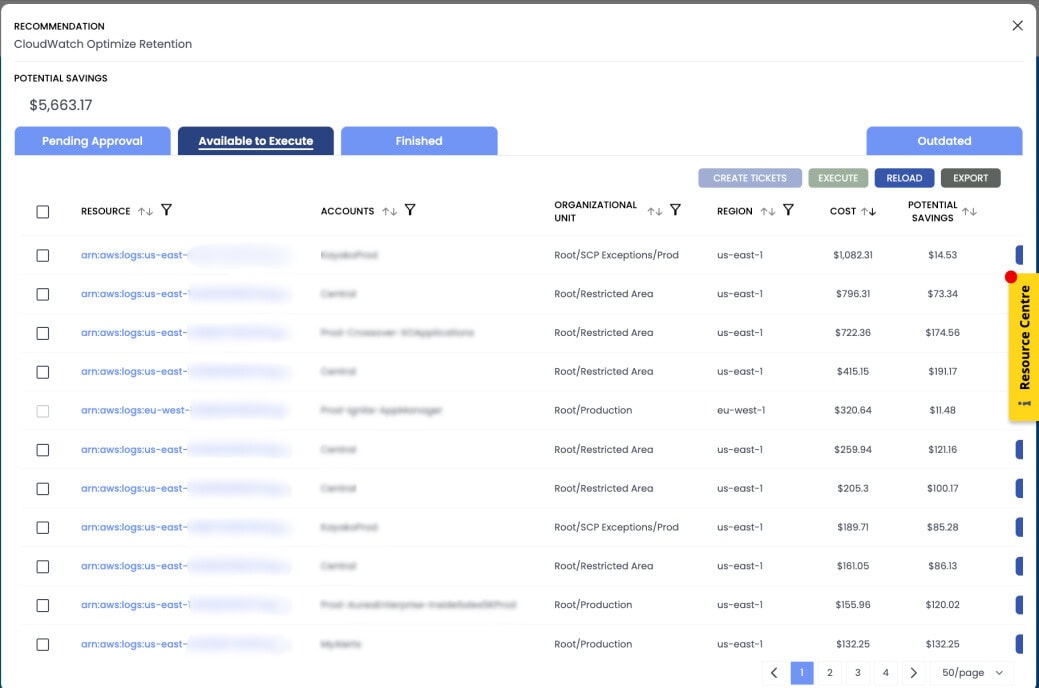
Looking at the dashboard, we can see several assets where the logging cost is in excess of $200 per month, and potential savings in the $100s.
Let’s take a look at one of the details to see the impact of log retention policies.
Click on the details for a particular asset, and you will see a screen like this:
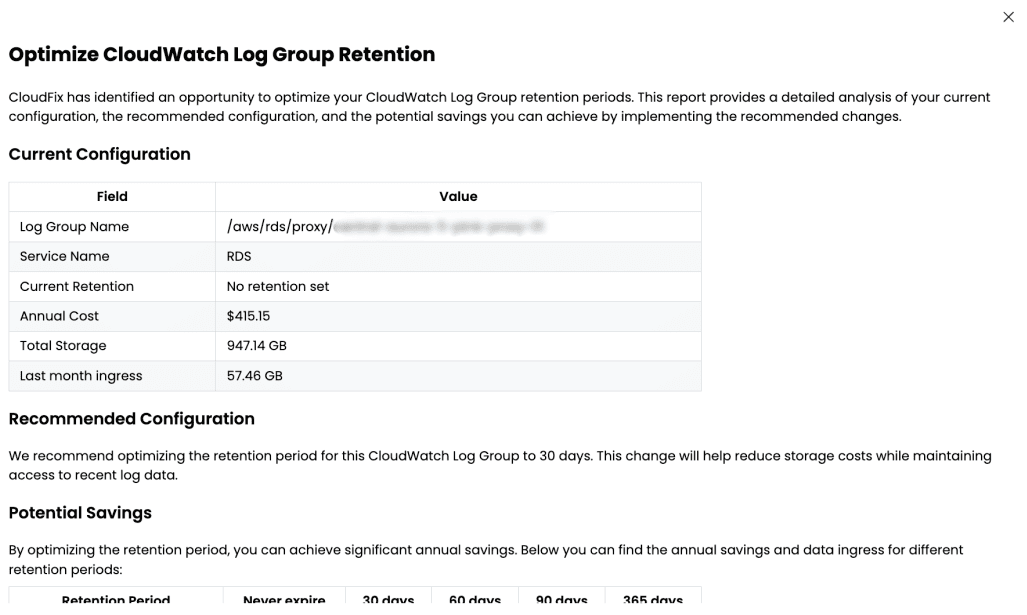
See that the annual cost is currently $415.15. This is based on a steady state of 57.46 GB of data ingested per month, and approximately 12 times that amount retained and stored at any given point in time. Important note: data ingest rates change depend on how much total data is ingested, but at the highest rate is $0.50 per GB. As more data is ingested, the ingestion cost decreases.
Compare this to a 30-day retention policy, where the annual cost drops to $18.41. This is a savings of $396.74 per year, or 95% of the cost. Adding this up across all assets, the potential savings is significant.
In the Details screen, we compute the potential savings based on the current ingestion rate, and 30-, 60-, 90-, 365-day, and indefinite retention periods.
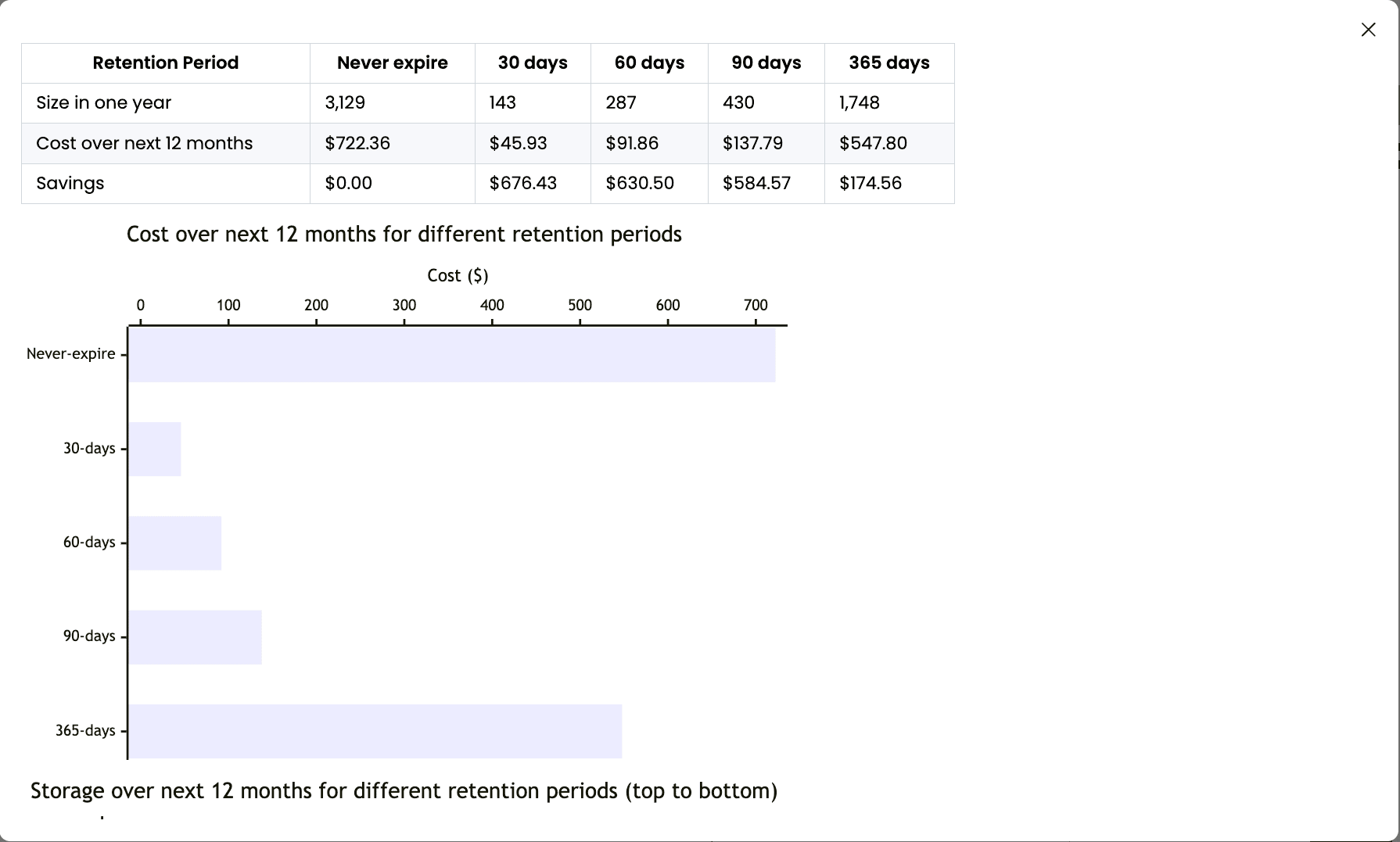
CloudFix recommends a retention period that has been found to be appropriate for most applications. The retention period is configurable: you can always override the recommendation, but we think the recommended setting is a good starting point unless you have an external reason (e.g. regulatory requirements) to keep logs for a longer period of time.
The benefits of CloudFix’s automated approach
It’s all too easy to forget to configure retention periods when creating new log groups, especially during rapid development or deployments. But don’t worry: CloudFix has your back! Our automated solution ensures that, even if you forgot to configure retention periods, the Finder/Fixer will catch the oversight and fix it for you!
How It Works
Our Finder/Fixer operates with CloudFix’s signature one-click automation, making it an ideal solution for DevOps and/or FinOps teams managing large-scale AWS environments. The finder looks, read-only, across the log groups in your AWS environment, including those created by RDS, VPC Flow Logs, EC2 instances (if you are running the CloudWatch agent), Lambda functions, CloudFront, API Gateway and CloudTrail. It identifies Log Groups without retention settings and shows the potential savings in the CloudFix dashboard. You review the fix in the CloudFix dashboard and approve it! The fixer then runs as an AWS Systems Manager Automation runbook in your own account and sets the retention period on the log group, and every execution is logged.
Important Note
If there are log groups where you want to keep the logs indefinitely, you can exclude them, and CloudFix will leave them alone.
Key Benefits
- Immediate Cost Reduction: Automatically remove unnecessary log data
- Zero Performance Impact: Changes affect only log retention, not application performance
- Complete Audit Trail: All changes tracked through AWS Systems Manager
- Organization-Wide Implementation: Apply consistent policies across all accounts
Getting Started with Automatic Log Group Retention
Implementing optimal log retention policies is now as simple as:
- Log into your CloudFix dashboard
- Review identified Log Groups without retention periods
- Click to approve the automated fix
Security and Compliance
Like all CloudFix Finder/Fixers, the CloudWatch Log Retention feature:
- Runs through AWS Systems Manager in your account, after you approve it
- Provides complete audit trails for each log group modification
- Requires no direct write access to your AWS accounts
- Can be rolled back if needed
Start Saving Today
Don’t let unnecessary log storage inflate your AWS bills. Log in to CloudFix now to see how much you could save with automated log retention management.
To get started with this and more than 50 other Finder/Fixers, get started with a free trial. Go to https://cloudfix.com/assessment to get started!
Going to re:Invent 2024? Want to talk about cost optimization? Sign up for a meeting with us at https://cloudfix.com/reinvent-2024. We hope to meet you there!