Fixer
Cut QuickSight Costs: Auto-Remove Idle Users
Auto-remove idle Amazon QuickSight users to cut BI costs. QuickSight charges per user monthly, even inactive ones. Find and remove idle users automatically.

“William is idle.”
– Billy Idol’s disapproving teacher, c. 1960s
Fun fact: Billy Idol, born William Michael Albert Broad, adopted the name “Billy Idle” after a teacher wrote “William is idle” on his report card. He eventually changed “Idle” to “Idol” to avoid association with Eric Idle, a British comedian and part of Monty Python.
The more you know, right?
Our idle talk doesn’t stop there. In this week’s fixer blog, we cover how removing idle users from Amazon QuickSight can help you right-size your usage and reduce costs by 50% or more – and how CloudFix makes the process as easy as dancing with yourself.
Table of contents
- Why it’s easy to overspend on Amazon QuickSight
- Reduce Amazon QuickSight costs by identifying and removing inactive users
- Optimize QuickSight easily and automatically with CloudFix
Why it’s easy to overspend on Amazon QuickSight
Amazon describes QuickSight as “Unified business intelligence at hyperscale.” While QuickSight may not be quite as feature-rich as solutions like Tableau or PowerBI, it’s typically more than sufficient for general dashboard requirements. As an AWS-native tool, it also integrates well with AWS data sources such as Athena, RedShift, and S3, and eliminates the overhead and potential security concerns of yet another vendor.
QuickSight’s pricing model is different from similar BI tools. Amazon bills a monthly rate for each active dashboard creator and a per-session rate (up to a fixed limit) for each dashboard user. Like other AWS products, this consumption-based pricing model introduces the opportunity for both savings and wasted spend.
In the Enterprise version, QuickSight’s pricing uses two metrics:
- Number of “Authors”: Authors are QuickSight users who can connect to dashboards, create data sets, and create and publish dashboards and reports, and other processes involving creating things.
- Number of “Readers”: Readers are QuickSight users who have the ability to view and interact with dashboards, filter data, and share dashboards and reports.
The Standard edition removes the concept of Readers and simply has Users. Both Standard and Enterprise editions can charge either on a higher month-to-month (M-to-M) rate or a lower rate for an annual commitment.
Here’s the monthly pricing for QuickSight, as of March 2023:
Enterprise | Standard | |||
M-to-M | Annual | M-to-M | Annual | |
Author | $24 | $18 | $9 | $12 |
Reader | $0.30/session up to $5 | |||
Author with Q | $34 | $28 | ||
Reader with Q | $0.30/session up to $10 | |||
Not cheap, right? Especially if you add QuickSight Q to the mix, which is an add-on that allows natural language querying of QuickSight. It’s easy to see how costs can add up as companies add users when necessary – and then promptly forget who has which kind of login, for what reason, and (most importantly) whether the account is being actively used.
Reduce Amazon QuickSight costs by identifying and removing inactive users
So, each Author in QuickSight costs about the same per month as going out to lunch. How bad can it be if we don’t keep track of them?
Let’s do some “back-of-the-envelope” calculations (well, maybe a couple of envelopes) to show how QuickSight costs can accumulate over time.
Consider a medium-sized company with 500 employees. The company begins a dashboarding, observability, and reporting initiative, and starts with 50 employees using QuickSight. The initial monthly cost for 50 Enterprise QuickSight accounts (without Q) is 50 * $24 = $1200/month, or $14,400 per year.
Eventually, though, those 50 initial users won’t all need QuickSight. Job descriptions change, roles evolve, people move on to different projects and no longer use their account. What they don’t do is go out of their way to tell IT that they’re no longer actively using QuickSight. So that seat is still taken – and new ones are added along the way.
You can see where we’re going with this: if you’re not paying attention, your costs will continue to rise. It’s important to identify and remove idle users – but how often?
Let’s run some numbers. Starting with the 50 QuickSight users, we’ll consider three scenarios:
- Inactive users are disabled every 6 months
- Inactive users are disabled every 3 months
- Inactive users are disabled monthly
To visualize the differences between the three scenarios, I put together a simple simulation. It includes the following assumptions:
- We start with 50 active QuickSight users
- A user has a 30% chance of going inactive every month
- Once a user goes inactive, they do not reactivate
- 5 new active users are added every month
- Pricing is based on Authors, as Enterprise month-to-month customers
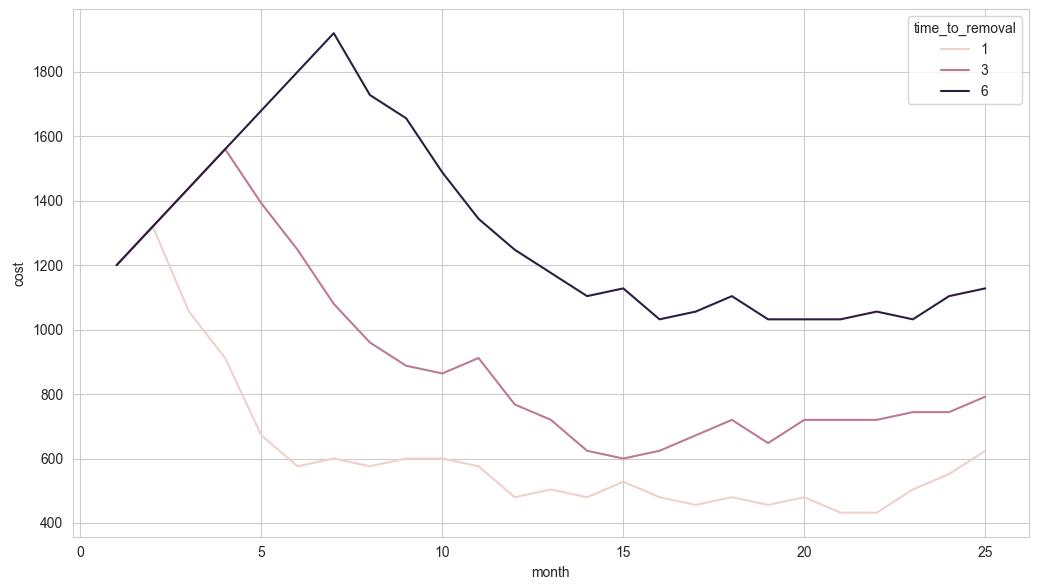
Looking at the graph: first, notice the straight line going upwards. This represents the increasing monthly costs as more users are added to QuickSight. Makes sense.
Without looking for inactive users, the monthly cost chart would continue to increase every single month. When we start to monitor for inactive users, however, the monthly cost starts to go down. Also makes sense.
In addition, the more often we check for inactive users, the lower the costs. In fact, checking every month versus every six months cuts costs by more than half – we’ve reduced the monthly bill from $1200/month to less than $600/month while still supporting the same amount of active users. That’s an extra $7k+ that just went back into the company’s pocket.
A couple more thoughts on this. The parameters that we used for the simulation are actually quite conservative estimates. At one large organization, a full 76% of QuickSight accounts had not been used in over a month. That’s a tremendous amount of savings right out of the gate.
Also, it’s worth it to regularly clean up your QuickSight accounts even if you’re on the annual plan. The annual plan only gives you a set number of seats. If inactive users are taking up those seats, you have to buy more. By removing inactive accounts every month, you ensure that you’re only paying for the seats that you need.
Optimize QuickSight easily and automatically with CloudFix
Case closed: identifying and deleting idle QuickSight users reduces costs and clutter. But doing it on a one-off basis wouldn’t work. Even in an imaginary world where every employee who stopped using QuickSight immediately reported that they were done with it, IT has much better things to do with their time than individually remove or switch around QuickSight users. And unlike most of the fixes we cover, there is no simple console or CLI route: doing it yourself means writing, scheduling, and maintaining a program. You could give it food and water and love. Or you could do something more valuable with your time while CloudFix does it for you.
CloudFix does the “finding” and the “fixing” for you, and keeps checking far more often than a once-a-month cleanup. Finding is read-only: CloudFix uses your QuickSight user list and account activity to identify billed users who have stopped logging in. Each opportunity appears in your Recommendations for you to approve. The fixer then runs as an AWS Systems Manager Automation runbook in your own account: it hands the user’s dashboards and analyses to an active admin so nothing is orphaned, then removes the user, and every execution is logged. That means you can trust that you’re only paying for the QuickSight accounts that you need.
Worried about reinstating an account if it’s deleted but still required? Not a problem. A removed user can be registered in QuickSight again at any time, from the console or with a single AWS CLI command.
That’s it for this week’s idle talk. QuickSight users: it’s a nice day to start again… start using CloudFix.