Fixer
Cut Your S3 GetObject Costs in Half
Cut Amazon S3 GetObject costs by optimizing Glue table formats for Athena queries. CloudFix identifies tables that could use columnar formats for big savings.

Are your Amazon Athena queries costing more than they should? CloudFix’s latest Finder/Fixer helps you automatically identify situations where AWS Glue tables /could/ be optimzed based on the structure of the S3 bucket data, using S3 bucket partitioning, but currently are not. It then shows you how much you could save by fixing your Athena queries to take better advantage of the partitioning which is already in place. Let’s have a look at how it works.
Athena, Glue, S3 Inventory, and S3 Bucket Partitioning
Before we dive into the Finder/Fixer, let’s have a look at the components involved in this process. The key components are:
- S3: AWS’s object storage service.
- Athena: The query engine used to analyze data stored in S3.
- Glue: AWS’s metadata catalog and ETL service that acts as a bridge between S3 and Athena. It creates and manages table definitions that tell Athena how to interpret data stored in S3, including critical information about data structure, format, and partitioning schemes.
- S3 Inventory: The process of collecting metadata about objects stored in S3.
- S3 Bucket Partitioning: The practice of organizing S3 objects into logical partitions based on attributes like date, category, or user.
The following diagram shows how these components interact:
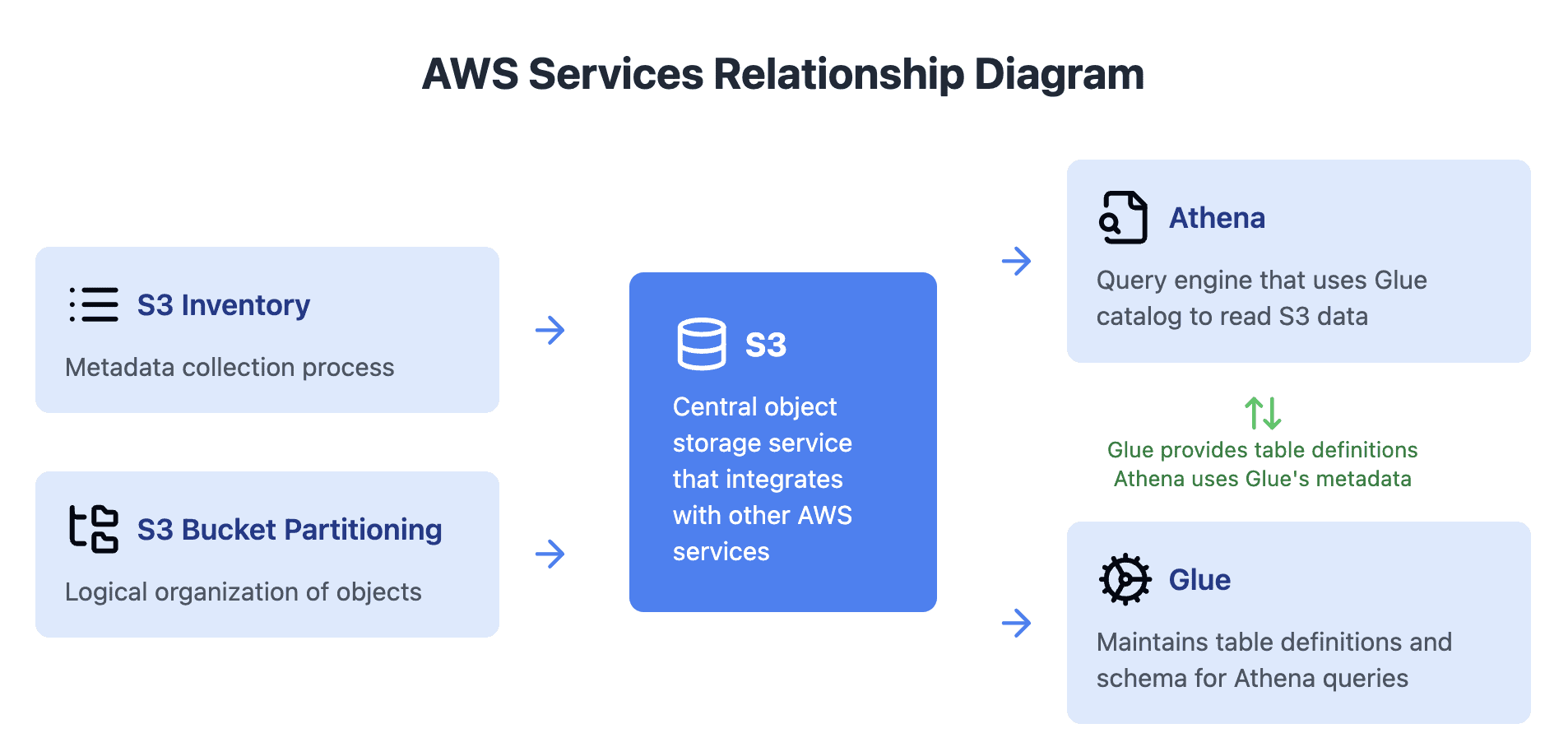
At the core of everything is S3. It is one of AWS’ oldest services. S3 stores files differently to a filesystem. Unlike traditional filesystems with hierarchical directories, an S3 bucket is essentially a flat collection of objects. However, S3 introduces the concept of “prefixes” which create a folder-like structure using the ‘/’ character in object names.
When S3 tools filter objects, they match these prefixes rather than traversing an actual directory structure. For example, in the path s3://my-data/2024/12/13/daily-report.csv, each segment separated by ‘/’ is simply part of the object’s key name, not a true folder hierarchy. A more effective approach for data organization is to explicitly label these segments as partition keys, such as s3://my-data/year=2024/month=12/day=13/daily-report.csv.
Bucket Partitioning Example
Assume you had a bucket with 10 years of data, 100 GB per year, and you wrote an Athena query that only needed one year of it, filtering on the date.
Without partitioning, this query would scan the entire 10 years of data, which is 1TB. In order to execute this query, the entire S3 bucket would be scanned. Note that S3 charges $0.0004 per 1,000 GET requests and $0.0025 per GB of data scanned. You definitely don’t want to scan all of your data if you know you really only need 10%.
Databases solved this problem long ago by using indexing. Indexing is a way that databases can quickly navigate through data associated with a particular column, e.g. a date.
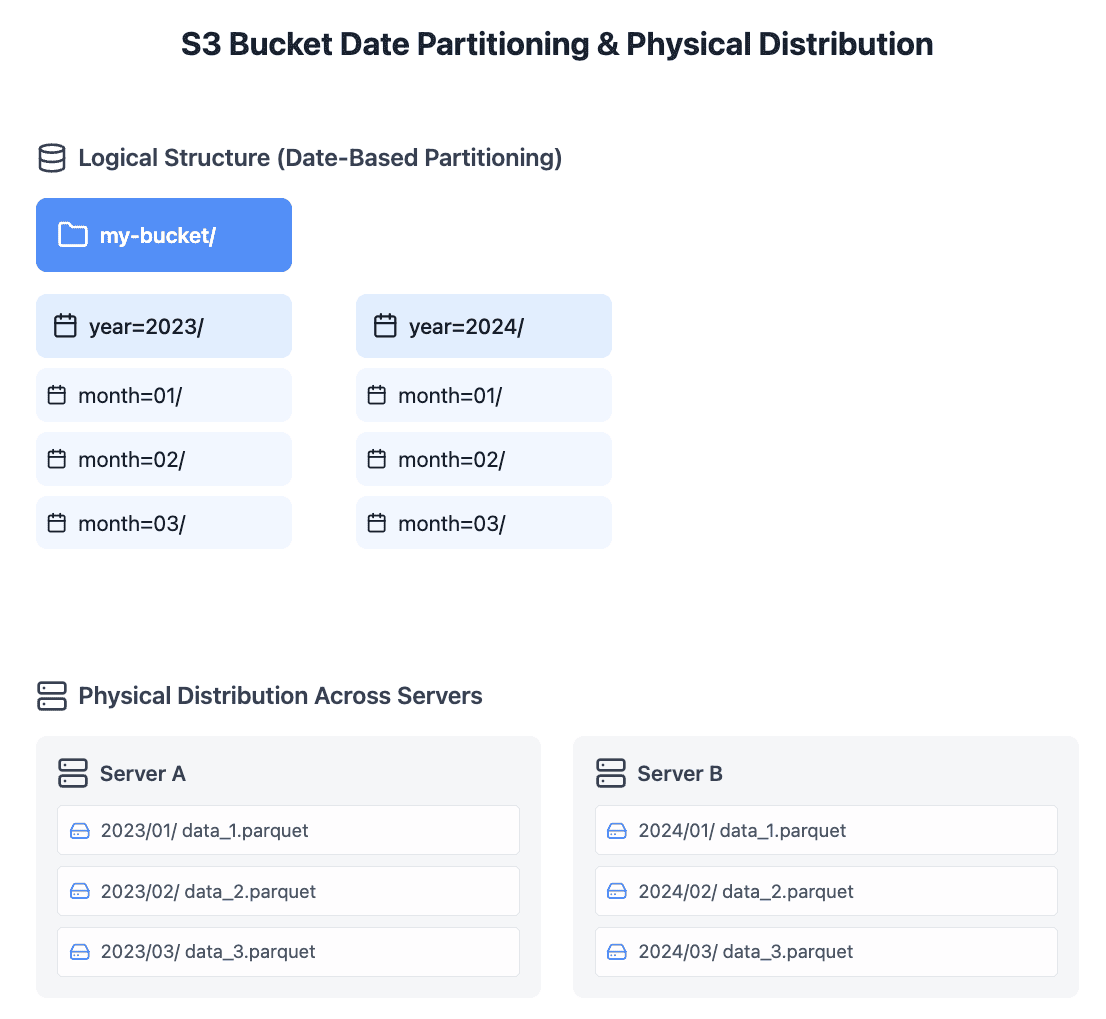
Going back to the example above, if your S3 bucket is using keys which suggest a partitioning strategy, AND Glue is setup to use this partitioning strategy, then Athena can use this partitioning strategy to scan only the relevant data. Glue catalogs the partitions and their locations and provides partition metadata to query engines (like Athena).
Here is a visual diagram of how this works:
Introducing the S3 Bucket Partitioning Finder/Fixer
CloudFix’s new S3 Bucket Partitioning Finder/Fixer automatically identifies S3-backed Glue tables which /could/ be using S3 bucket partitioning, but currently are not.
How It Works
This CloudFix Finder/Fixer focuses on the Finder phase, as the fix may be specific to how you want your data organized. Finding is read-only: CloudFix uses your cost and usage data and your S3 Inventory listings, with AI-powered pattern detection, to spot Glue tables whose S3 data is already organized into logical partitions (by date, category, user, or a mix) that the table doesn’t take advantage of. Each opportunity appears in your Recommendations with the potential savings and recommended next steps, and you make the change yourself by updating the Glue table to use the partitioning strategy.
Key Advantages
- Cost Optimization: Reduce Athena query costs by scanning only relevant data partitions
- Performance Improvement: Faster query execution through efficient data filtering
- Your data stays put: partitioning changes how Athena finds data, not the data itself or your query results.
- AI-Powered Analysis: Intelligent detection of optimal partitioning strategies
- Automated Discovery: Continuous monitoring for optimization opportunities
Getting Started
To take advantage of this new Finder/Fixer:
- Ensure S3 Inventory is enabled for your buckets (CloudFix has a separate Finder/Fixer for this!)
- Review the identified optimization opportunities in your CloudFix dashboard
- Implement the recommended partitioning strategies through your AWS Glue tables
Looking Ahead
While this Finder/Fixer currently focuses on recommending partitioning strategies, we’re excited about future enhancements, especially with AWS’s recent announcement of queryable object metadata for S3 buckets. Stay tuned for more updates as we continue to evolve our cost optimization capabilities.
Ready to optimize your Athena queries and reduce costs? Log in to CloudFix today to start using the S3 Bucket Partitioning Finder/Fixer. For additional support or questions, contact our team at support@cloudfix.com.
Not using CloudFix yet? Sign up for a free Savings Assessment to get started.