Fixer
Automatically Removing Idle DynamoDB Tables
Delete idle DynamoDB tables that incur storage and throughput costs with zero usage. CloudFix identifies and safely removes unused DynamoDB tables.

CloudFix features many different optimizations. Broadly speaking, we have Finder/Fixers which adjust, and others which eliminate. Examples of adjusting finder/fixers are Optimize AWS EC2 Auto Scaling Groups and S3 Intelligent Tiering. These Finder/Fixers are typically based on a cost-tradeoff, and CloudFix adds value by doing this calculation and implementing the fix. The eliminating Finder/Fixers get rid of idle resources.
There is something jarring about paying for things you aren’t using. I’m sure I’m not the only one who has seen something on their credit card and thought “Oh shoot! How long have I been paying for that?” We can’t help you with that Hulu subscription you forgot to cancel, but idle AWS resources can get A LOT more expensive and that is exactly what we can help with.
In this blog post, I’ll talk about the situations where DynamoDB incurs a fixed cost, how we identify idle DynamoDB tables, and our process for deactivating them.
What is DynamoDB?
DynamoDB is AWS’s flagship NoSQL database service, offering consistent single-digit millisecond performance at any scale. However, like many cloud resources, DynamoDB tables can sometimes fall into disuse while continuing to generate costs. This commonly happens during development and testing phases, or when applications are deprecated but their supporting infrastructure remains.
The challenge isn’t just identifying these idle tables – it’s also ensuring their safe removal while maintaining proper backups for compliance and recovery purposes. Manual identification and cleanup processes are time-consuming and error-prone, making automation the ideal solution.
DynamoDB Pricing and Options
DynamoDB pricing two major dimensions: Provisioned vs On-Demand and Standard vs Infrequent Access. Here is an infographic to show where the different scenarios are relevant.
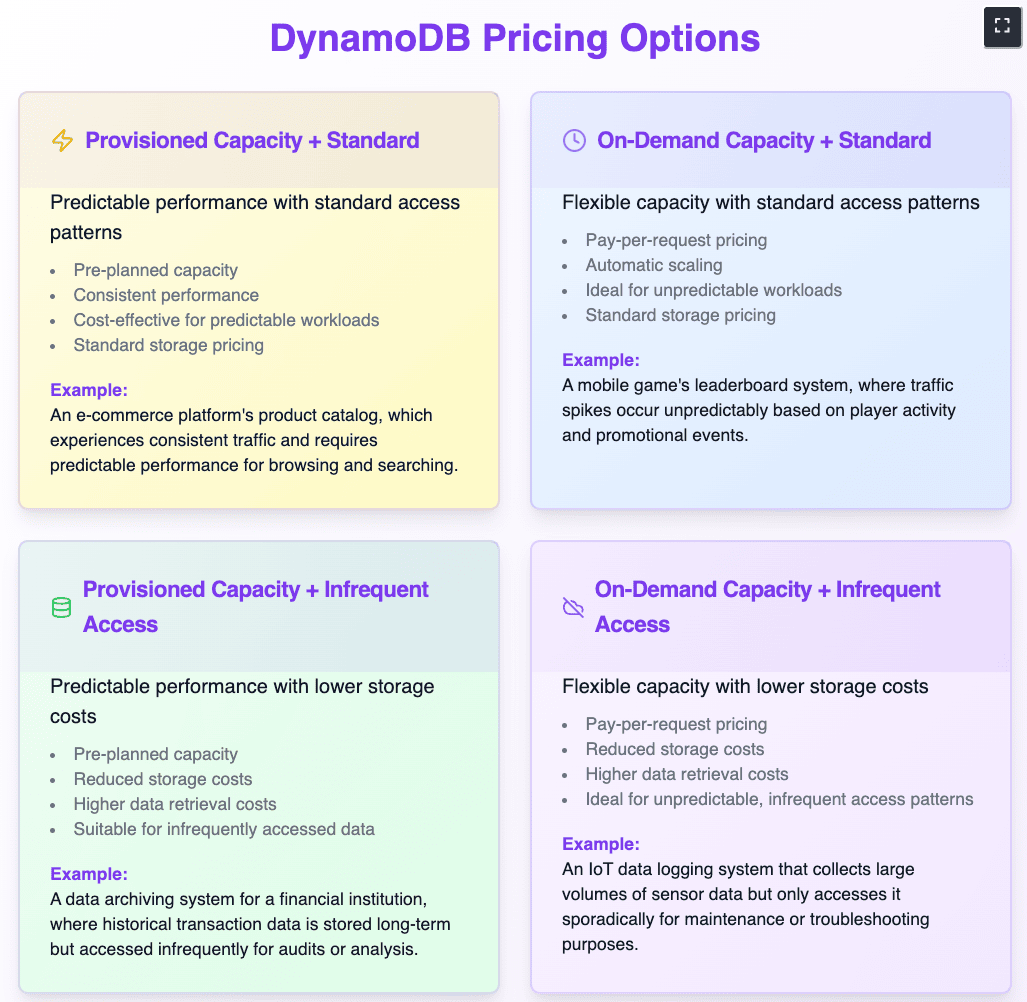
Provisioned vs On-Demand, Standard vs Infrequent
In us-east-1, as of Feb 2025, the pricing is given in this table:
Feature | Provisioned Capacity | On-Demand Capacity |
Writes | $0.00065 per WCU per hour (~$0.043 per million writes) | $1.25 per million write request units |
Reads | $0.00013 per RCU per hour (~$0.043 per million reads) | $0.25 per million read request units |
Storage | $0.25 per GB per month (Standard) | $0.25 per GB per month (Standard) |
Whether to use Provisioned or On-Demand is the subject of a different article. Provisioned Capacity DynamoDB tables incur an hourly charge, so we certainly do not want to be paying that. However, in either case we are paying for storage at a relative premium – DynamoDB cold storage is 1/8th the price! If we aren’t using the table at all, then let’s not pay for it either way.
Identifying Idle Tables: CloudFix’s Smart Finder
Finding is read-only. CloudFix uses your AWS Cost and Usage Report data and DynamoDB’s own utilization metrics to find tables across your organization that have gone unused for an extended period. The lookback period and activity threshold are configurable, and you can exclude tables you want CloudFix to leave alone. Idle tables appear in your Recommendations, and nothing happens until you approve.
This cautious approach ensures that only genuinely idle tables are flagged for removal, preventing any disruption to active workloads.
Locking in the Savings: CloudFix’s Smart Fixer
Once you approve, the fix runs as an AWS Systems Manager Automation runbook in your own account. It takes a backup of the idle table, which moves to lower-cost cold storage, and only once the backup has completed successfully is the table deleted. Every execution is logged. Savings unlocked ✅
A Numerical Example
Let’s look at a typical scenario. A development team creates multiple DynamoDB tables during a three-month project. This can happen easily during a project, with different tables for dev, test, staging, prod, and various feature tables. After the project concludes, these test tables remain unused but provisioned. With 10 idle tables each provisioned with 100 RCUs and 100 WCUs (.
-
Storage Cost: 10GB × $0.25 = $2.50 per month
-
Provisioned Capacity:
- Write Capacity Units (WCU): 100 WCU @ $0.00065 per WCU-hour
100 WCU × $0.00065 × 730 hours = $47.45 per month
- Write Capacity Units (WCU): 100 WCU @ $0.00065 per WCU-hour
-
- Read Capacity Units (RCU): 100 RCU @ $0.00013 per RCU-hour
100 RCU × $0.00013 × 730 hours = $9.49 per month
- Read Capacity Units (RCU): 100 RCU @ $0.00013 per RCU-hour
-
Monthly cost per table = $2.50 (storage) + $47.45 (WCU) + $9.49 (RCU) = $59.44 per table
-
Total monthly cost ~ $600/month
With this CloudFix Finder/Fixer, rather than pay for the WCUs and RCUs, you pay the storage cost at the cold storage rate of $0.03/GB, or $0.30/month per table, for $3/month total. This is the difference between, say, a single espresso vs a Rancilio Silvia Espresso machine. Maybe use 1 month’s of savings to get one for the office!
Getting Started with CloudFix’s DynamoDB Optimization
Ready to start optimizing your DynamoDB costs? CloudFix makes it simple:
- Enable the DynamoDB idle table fixer in your CloudFix dashboard
- Configure your preferred detection thresholds and backup retention policies
- Review the automatically generated findings
- Approve the recommended actions
CloudFix handles the rest, ensuring your DynamoDB infrastructure stays lean and cost-effective without compromising data safety or compliance requirements.
Beyond DynamoDB: Comprehensive Cost Optimization
The DynamoDB idle table fixer is just one of many ways CloudFix helps optimize your AWS costs. Check out our other blog posts for details on additional fixers or find out how much you could save with our free, secure, personalized savings assessment.
Ready to start saving on AWS? See how much you could cut from your cloud bill with a free cost optimization assessment, or explore CloudFix automated Finder/Fixers that eliminate waste across 30+ AWS services.
Related Articles
- AWS Cost Optimization: The Complete Guide to Lowering Your Cloud Bill (2026)
- AWS Cost Optimization Tools: The Complete Comparison Guide (2026)
- Aurora I/O-Optimized vs Standard: Break-Even Calculator & Migration (2026)
- CloudFix Finder/Fixer: RDS Optimize EOL Version
- CloudFix Finder/Fixer: Neptune Delete Idle Clusters