Fixer
Optimize AWS EC2 Auto Scaling Groups
Optimize AWS EC2 Auto Scaling Groups by right-sizing instance types based on actual utilization. CloudFix analyzes ASG performance for cost-saving changes.

Automating AWS Auto Scaling Group Optimization with CloudFix: A Deep Dive
If you’re running workloads on AWS, there’s a good chance you’re using Auto Scaling Groups (ASGs) to manage your EC2 instances. While ASGs are great for maintaining application availability, they can also be a source of unnecessary costs if not optimized properly. In this blog post, we’re going to look at how CloudFix’s ASG Finder/Fixer works to automatically identify and implement cost-saving opportunities for your Auto Scaling Groups.
What are Auto Scaling Groups?
If you’re already managing EC2 instances, you know the challenges of manually adjusting your instance count as demand changes. Auto Scaling Groups (ASGs) solve this by automating the process of launching and terminating EC2 instances. Instead of manually creating instances or writing custom scaling scripts, you define a template for your instances and set conditions for when to add or remove capacity.
For example, if you’re currently running a fixed number of t3.large instances for your application, an ASG could automatically launch additional instances when CPU utilization exceeds 70% and terminate them when utilization drops below 30%. This happens automatically, following rules you define, without requiring manual intervention.
Some practical uses of ASGs include:
- Replacing manual instance management with automated scaling rules based on CloudWatch metrics
- Maintaining high availability by automatically distributing instances across your chosen AZs
- Automatically replacing failed instances without waiting for someone to notice and intervene
- Reducing costs by automatically scaling down during off-peak hours
While ASGs simplify EC2 management, their configuration can significantly impact your AWS costs. This is where CloudFix comes in.
How the ASG Finder/Fixer Works
The finder works read-only from your cost and usage data, looking for EC2 instances in Auto Scaling Groups where a different instance type would cost less, and it steers clear of infrastructure that is unsafe to change. Every suggested change is backed by AWS Compute Optimizer’s machine learning-driven recommendations for your workload, and savings are calculated against what you actually pay, including Savings Plans and Reserved Instances. Each opportunity appears in your Recommendations for you to approve. The fixer then runs as an AWS Systems Manager Automation runbook in your own account and updates the group to the recommended instance type, and every execution is logged.
Benefits of Automated ASG Optimization
-
Consistent Cost Savings
- Automatically implements AWS-recommended instance type changes
- Typically achieves 10-15% savings on applicable ASGs
- Changes follow AWS’s own instance recommendations and run only after you approve them
-
Zero Operational Overhead
- No manual analysis required
- Automated implementation of changes
- Built-in safety checks and validations
-
Continuous Optimization
- Regular re-evaluation of ASG configurations
- Adapts to new instance types and pricing
- Keeps up with AWS’s latest recommendations
Getting Started
To start optimizing your Auto Scaling Groups with CloudFix:
- Click on the EC2 Resize ASG Instances button in your CloudFix dashboard
- Review the automatically generated savings recommendations:
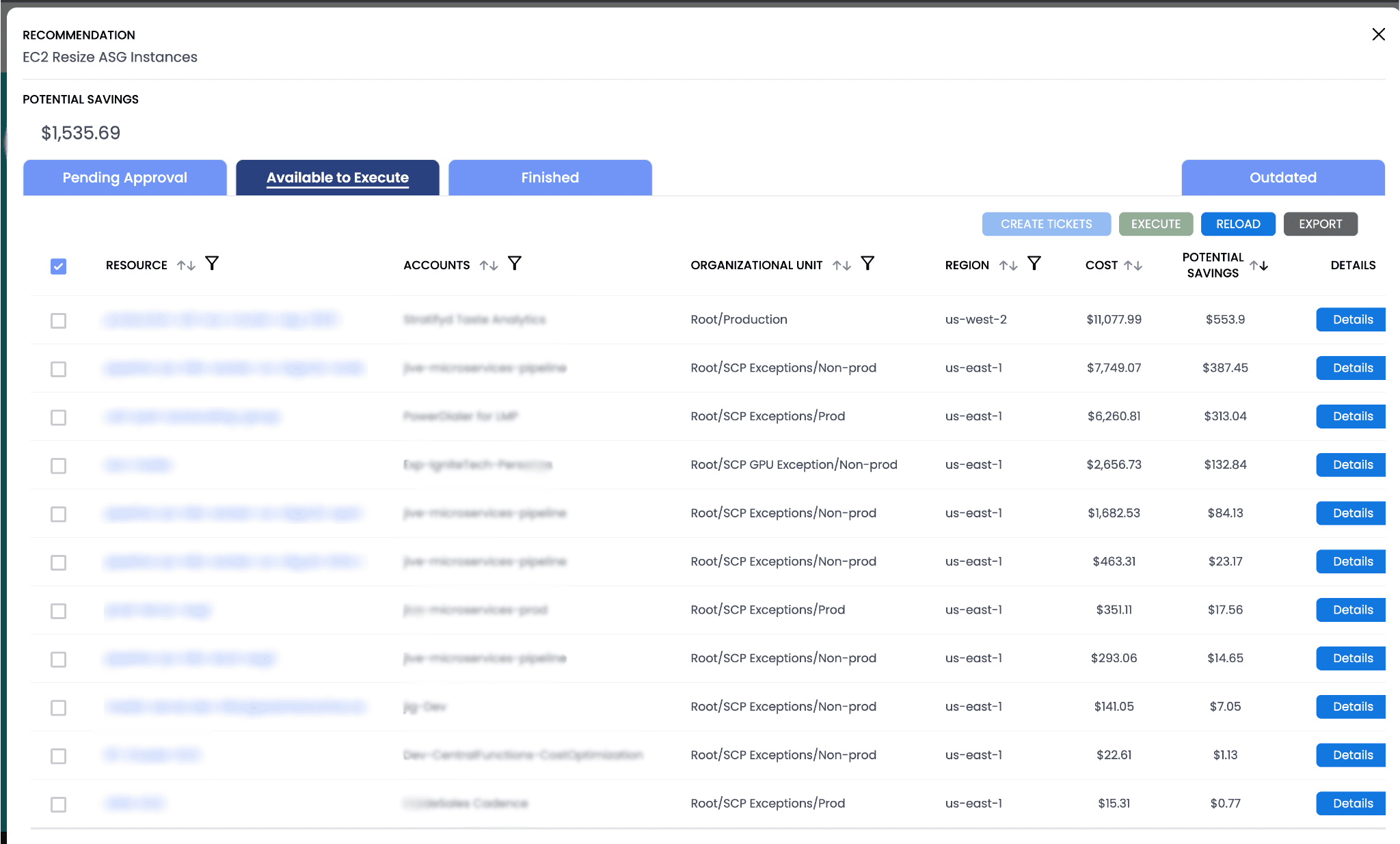
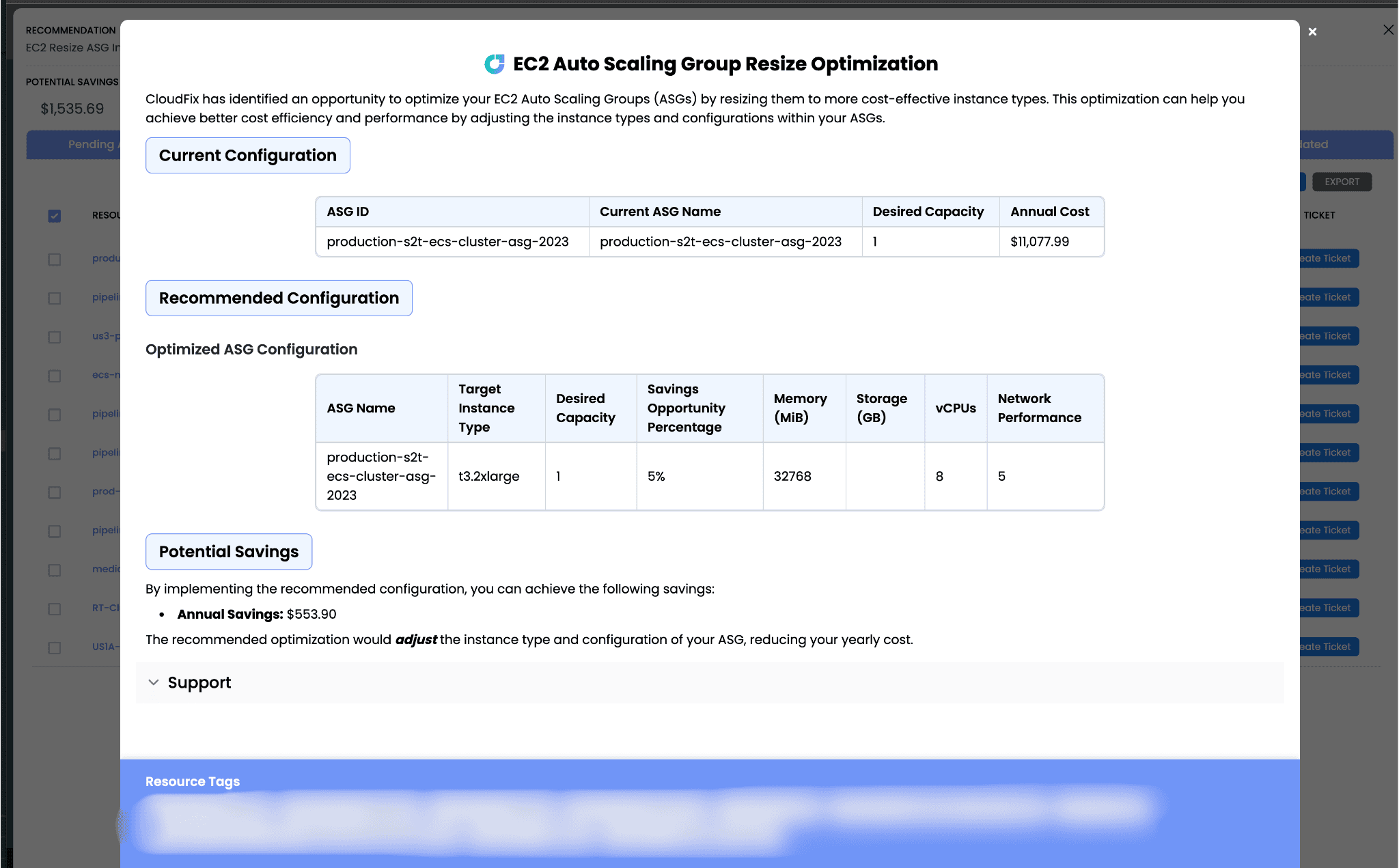
- Click on “Create Ticket”
This will use our JIRA integration. Alternatively, depending on how things are configured, you can click “Execute” if it is available to trigger the change process.
Remember, CloudFix only implements changes that are:
- Recommended by AWS
- Validated for safety
- Proven to generate savings
- Free from performance impact
Ready to start optimizing your AWS Auto Scaling Groups? Try CloudFix today and see how much you can save, with every change approved by you.
Ready to start saving on AWS? See how much you could cut from your cloud bill with a free cost optimization assessment, or explore CloudFix automated Finder/Fixers that eliminate waste across 30+ AWS services.
Related Articles
- AWS Cost Optimization: The Complete Guide to Lowering Your Cloud Bill (2026)
- AWS Cost Optimization Tools: The Complete Comparison Guide (2026)
- RightSpend vs ProsperOps (Flexera): The Independent EC2 Discount Alternative
- Find Idle AWS Transfer Family Endpoints
- CloudFix Finder: SageMaker Rightsize Instances (Manual Fix)