CloudFix Feature
GP3 vs io1/io2 AWS Pricing: When GP3 Is 60–87% Cheaper
Compare GP3 vs io1/io2 with real AWS pricing, IOPS limits, and migration steps. Find out when GP3 replaces io2 and when it doesn't.

Part of our complete AWS Storage Cost Optimization guide.
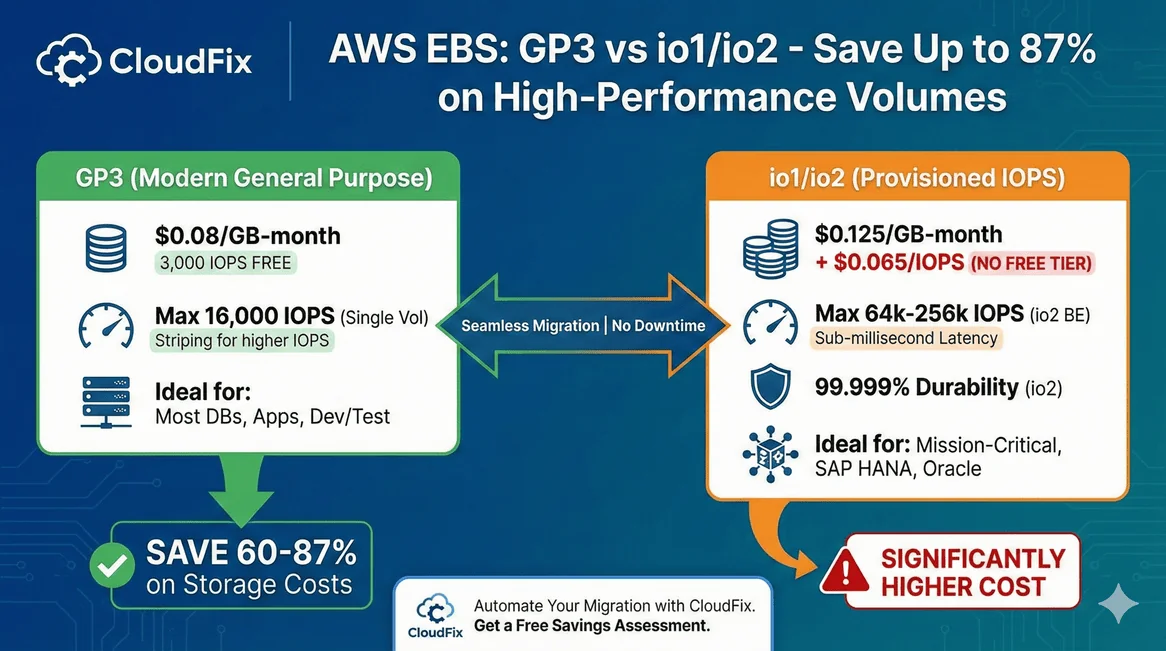
Quick Answer: Switch to GP3 unless you need sustained sub-millisecond latency or more than 16,000 IOPS. GP3 includes 3,000 IOPS free (extra IOPS at $0.005 each) and runs 60–87% cheaper than io1/io2 for the same workload. Most io1/io2 volumes are over-provisioned and never touch the performance they pay for.
Not sure if your io1/io2 volumes actually need that performance? CloudFix profiles each one, flags which can safely drop to GP3, and migrates them automatically: you approve, we fix it. See your numbers in a free AWS savings assessment.
This guide covers when GP3 can replace io1/io2, how to calculate your savings, and how to migrate without downtime.
GP3 vs io1/io2: Quick Comparison
| Feature | GP3 | io1 | io2 | io2 Block Express |
|---|---|---|---|---|
| Storage Cost | $0.08/GB-month | $0.125/GB-month | $0.125/GB-month | $0.125/GB-month |
| IOPS Cost | 3,000 free, then $0.005/IOPS | $0.065/IOPS | $0.065/IOPS (tiered) | $0.065/IOPS (tiered) |
| Max IOPS | 16,000 | 64,000 | 64,000 | 256,000 |
| Max Throughput | 1,000 MB/s | 1,000 MB/s | 1,000 MB/s | 4,000 MB/s |
| Durability | 99.8-99.9% | 99.8-99.9% | 99.999% | 99.999% |
| Max Volume Size | 16 TB | 16 TB | 16 TB | 64 TB |
| Multi-Attach | No | Yes | Yes | Yes |
| Latency | Single-digit ms | Single-digit ms | Sub-millisecond | Sub-millisecond |
The key differences:
- io2 offers 10x better durability (99.999% vs 99.9%)
- io1/io2 support up to 64,000 IOPS (GP3 maxes at 16,000)
- io1/io2 support Multi-Attach for shared storage
- GP3 costs dramatically less for equivalent IOPS
Why io1/io2 Costs So Much More
The cost difference comes down to IOPS pricing.
GP3 includes 3,000 IOPS free. Additional IOPS cost $0.005 each.
io1/io2 charges $0.065 per IOPS with no free tier are 13x more expensive per IOPS.
Example: 5 TB volume with 6,000 IOPS and 500 MB/s throughput
| Component | GP3 | io2 |
|---|---|---|
| Storage | 5,000 GB × $0.08 = $400 | 5,000 GB × $0.125 = $625 |
| IOPS | 3,000 additional × $0.005 = $15 | 6,000 × $0.065 = $390 |
| Throughput | 375 MB/s additional × $0.04 = $15 | Included |
| Total | $430/month | $1,015/month |
GP3 costs 42% of io2 for the same specifications. That’s a 58% savings.
For higher IOPS workloads, the gap widens:
Example: 1 TB volume with 10,000 provisioned IOPS
| Volume Type | Monthly Cost |
|---|---|
| GP3 | $80 (storage) + $35 (7,000 extra IOPS) = $115 |
| io1/io2 | $125 (storage) + $650 (10,000 IOPS) = $775 |
GP3 costs 85% less than io1/io2 at the same IOPS level.
io1/io2 is usually the biggest EBS waste we find.
Most teams over-provision IOPS by 5-10x. This checklist covers 32 AWS cost optimizations, including how to spot over-provisioned volumes in your own accounts.
When to Use GP3 Instead of io1/io2
Use GP3 if:
- Your workload needs 16,000 IOPS or less
- Standard durability (99.8-99.9%) is acceptable
- You don’t need Multi-Attach
- Consistent single-digit millisecond latency is sufficient
This covers most database workloads, application servers, and development environments.
Keep io1/io2 if:
- You need more than 16,000 IOPS per volume
- Your application requires 99.999% durability
- You need Multi-Attach for clustered storage
- Sub-millisecond latency is required
Typical io2 use cases: SAP HANA, large Oracle/SQL Server databases, high-frequency trading systems.
Scaling Beyond 16,000 IOPS with GP3
GP3’s 16,000 IOPS limit sounds restrictive, but you can work around it with volume striping (RAID 0).
Example: Database requiring 90,000 IOPS
Using multiple GP3 volumes striped together:
| Configuration | Volumes | IOPS | Monthly Cost |
|---|---|---|---|
| GP3 (RAID 0) | 6 × 2 TB | 6 × 16,000 = 96,000 | 6 × $223 = $1,338 |
| io2 | 4 × 3 TB | 4 × 22,500 = 90,000 | 4 × $1,830 = $7,320 |
Same performance, 82% lower cost with GP3.
Most modern database engines (Oracle ASM, PostgreSQL, MySQL) handle striped volumes without issues.
Real-World Savings: 4-Node Oracle Database
Here’s a calculation from an actual customer scenario:
Requirements: 4 nodes, 12 TB storage per node, ~90,000 IOPS per node
| Configuration | GP3 | io2 Block Express |
|---|---|---|
| Volumes per node | 6 | 4 |
| Storage per volume | 2 TB | 3 TB |
| IOPS per volume | 16,000 | 22,500 |
| Total IOPS per node | 96,000 | 90,000 |
| Volume cost | $223 | $1,830 |
| Node cost | $1,341 | $7,321 |
| 4-node cluster cost | $5,364/month | $29,284/month |
Annual savings: $287,040
GP3 costs 18% of io2 Block Express while delivering equivalent IOPS.
How to Migrate io1/io2 to GP3
Migration requires no downtime. AWS modifies volumes in place.
Pre-Migration Checklist
- Verify IOPS requirements: Check CloudWatch metrics to confirm actual IOPS usage
- Confirm durability needs: Is 99.999% durability actually required? Do you work for NASA?
- Check for Multi-Attach: GP3 doesn’t support shared volumes
- Calculate target specs: Determine IOPS and throughput for GP3
Using AWS Console
- Go to EC2 → Elastic Block Store → Volumes
- Select the io1/io2 volume
- Click Actions → Modify Volume
- Change Volume Type to gp3
- Set IOPS (up to 16,000) and Throughput (up to 1,000 MB/s)
- Click Modify
Using AWS CLI
aws ec2 modify-volume
  --volume-id vol-1234567890abcdef0
  --volume-type gp3
  --iops 10000
  --throughput 500
Migration Timing
- Modifications complete live with no downtime
- Typical completion: Under 6 hours for 1 TB
- Large volumes may take up to 24 hours
- Performance maintained during transition
Common Questions
Will I notice a performance difference?
For workloads under 16,000 IOPS, no. GP3 and io1/io2 have the same single-digit millisecond latency for standard operations. io2 Block Express offers sub-millisecond latency, which matters for specific high-frequency workloads.
What about durability?
GP3 offers 99.8-99.9% durability. io2 offers 99.999%. For context, industry-standard SSDs have around 1% annual failure rates. Both are extremely reliable. The question is whether you need five-nines durability for your specific workload.
Can I migrate back to io1/io2?
Yes. Volume type changes are reversible using the same modification process.
Do I need to stop my instance?
No. EBS Elastic Volumes allows in-place modification without detaching the volume or stopping the instance.
What if I need more than 16,000 IOPS?
Use volume striping (RAID 0) to aggregate multiple GP3 volumes. This is cheaper than io2 in almost all scenarios.
Should I migrate RDS databases too?
Yes. CloudFix has a separate fixer for RDS io1/io2 to GP3 migrations. The same cost savings apply.
Migrate at Scale with CloudFix
Identifying io1/io2 volumes that can migrate to GP3 requires checking IOPS usage, durability requirements, and Multi-Attach status across all your accounts. Doing this manually is tedious and error-prone.
CloudFix automatically:
- Scans all accounts for io1/io2 volumes
- Uses each volume’s own utilization metrics to confirm what it actually needs
- Calculates potential savings for each volume
- Excludes volumes that genuinely need io1/io2 capabilities
- Migrates the volumes you approve through an AWS Systems Manager Automation runbook in your account, with every execution logged
Get a free savings assessment to see how much you’re overspending on io1/io2 volumes.
Related Resources:
-
AWS EBS Volume Types
What if you’re overpaying by 87% on more than just EBS?
We’ve seen teams save $287K/year on io2 migrations alone. CloudFix finds every opportunity across your entire AWS footprint. Free assessment, results typically within 24 hours.
Get Your Free Assessment →
Download the Checklist
Related Articles
- AWS Cost Optimization: The Complete Guide to Lowering Your Cloud Bill (2026)
- AWS Cost Optimization Tools: The Complete Comparison Guide (2026)
- DynamoDB Standard-IA: Save 60% on Storage Costs (2026 Guide)
- GP2 vs GP3 AWS: 20% Cheaper, Faster IOPS, Full Cost Comparison
- CloudFix Finder/Fixer: RDS Optimize Storage