CloudFix Feature
DynamoDB Standard-IA: Save 60% on Storage Costs (2026 Guide)
DynamoDB Standard-IA reduces storage costs by 60% for infrequently accessed tables. Learn when to switch, calculate savings, and migrate with zero downtime.

DynamoDB Standard-IA reduces storage costs by 60% compared to the standard table class. If you have tables storing data that’s rarely accessed such as logs, order history, old user data, you’re overpaying by keeping them in the default Standard class.
The tradeoff is simple: Standard-IA costs less for storage ($0.10/GB vs $0.25/GB) but more for reads and writes (~25% higher). For tables where storage is the dominant cost, the math works heavily in favor of Standard-IA.
This guide covers when to use DynamoDB Standard-IA, how to calculate potential savings, and how to migrate tables without downtime or code changes.
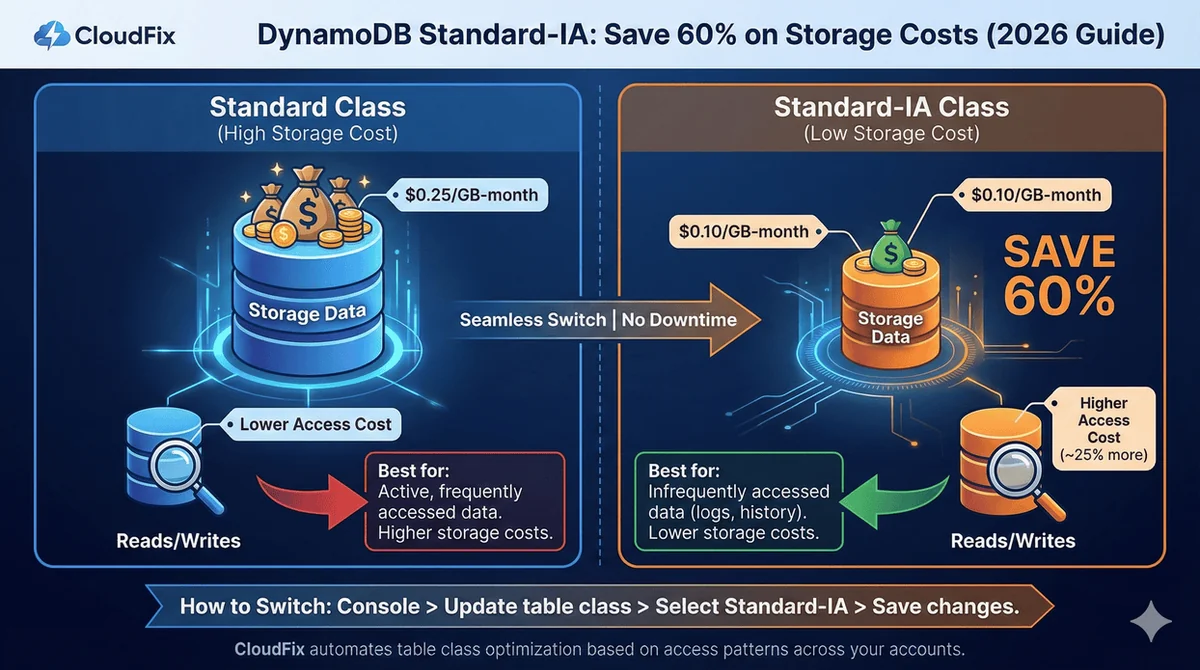
DynamoDB Standard vs Standard-IA Pricing
| Component | Standard | Standard-IA | Difference |
|---|---|---|---|
| Storage | $0.25/GB-month | $0.10/GB-month | 60% less |
| Read (On-Demand) | $0.25/million RRUs | $0.31/million RRUs | 24% more |
| Write (On-Demand) | $1.25/million WRUs | $1.56/million WRUs | 25% more |
| Read (Provisioned) | $0.00013/RCU-hour | $0.00016/RCU-hour | 23% more |
| Write (Provisioned) | $0.00065/WCU-hour | $0.00081/WCU-hour | 25% more |
Prices for us-east-1. First 25 GB free for Standard class.
Key insight: Standard-IA makes sense when storage costs exceed ~50% of your total table costs.
When to Use Standard-IA
Good candidates for Standard-IA:
- Application logs stored for compliance
- E-commerce order history older than 90 days
- User activity data rarely queried
- Historical gaming achievements
- Old social media posts
- Audit trails and archived records
Keep in Standard:
- Active session data
- Shopping carts and in-progress orders
- Frequently queried user profiles
- Real-time analytics tables
- Any table with high read/write activity relative to size
DynamoDB is just one of 8 database optimizations in our checklist.
RDS storage migrations, idle cluster cleanup, Aurora I/O-Optimized: we’ve compiled 30+ AWS cost optimizations with exact “how to spot this” guidance for each.
Calculating Your Savings
The decision formula is straightforward:
Savings = (0.6 × storage cost) – (0.25 × access cost)
If this number is positive, switch to Standard-IA.
Example Calculations
| Table | Storage (GB) | Monthly Reads | Monthly Writes | Standard Cost | Standard-IA Cost | Savings |
|---|---|---|---|---|---|---|
| OrderHistory | 500 | 5M | 1M | $127.50 | $53.53 | 58% |
| UserActivity | 200 | 50M | 10M | $75.00 | $42.05 | 44% |
| SessionData | 50 | 500M | 100M | $262.50 | $295.80 | Use Standard |
OrderHistory: Storage-dominated table. Perfect for Standard-IA.
UserActivity: Moderate access, still storage-heavy. Standard-IA wins.
SessionData: Access-heavy table. Keep in Standard.
Real-World Case Study
AWS provides this example in their documentation:
Workload: 1.2 TB storage, 42.5M reads, 42.5M writes monthly
| Class | Storage | Access | Total |
|---|---|---|---|
| Standard | $293.75 | $31.87 | $325.62 |
| Standard-IA | $120.00 | $39.74 | $159.74 |
Monthly savings: $165.88 (51%)
How to Switch Table Classes
Switching from Standard to Standard-IA requires no downtime, no data migration, and no code changes. It’s a configuration change.
Using AWS Console
- Open the DynamoDB console
- Select your table
- Click Actions → Update table class
- Select DynamoDB Standard-IA
- Click Save changes
The change takes effect immediately.
Using the AWS CLI or SDK
The same change is a single table update in the AWS CLI or SDKs: set the table class to Standard-IA, or set it back to Standard to reverse it.
Limitations
- You can only change table class twice per 30 days
- Reserved Capacity doesn’t apply to Standard-IA tables
- Global Secondary Indexes (GSIs) automatically use the same class as the base table
Finding Tables to Migrate
Identifying which tables should switch comes down to comparing each table’s storage cost with its read and write cost. You can do this manually with AWS Cost Explorer or the Cost and Usage Report (CUR).
Quick Method: Cost Explorer
- Go to AWS Cost Explorer
- Filter by Service: DynamoDB
- Group by Usage Type
- Compare the storage usage types against the read and write capacity usage types
If storage is more than 50% of total cost for a table, it’s a candidate.
Frequently Asked Questions
Does switching to Standard-IA affect performance?
No. Standard-IA provides identical latency, throughput, durability, and availability as Standard tables. The only difference is pricing.
Can I switch back from Standard-IA to Standard?
Yes. Use the same process (console, CLI or SDK). Changes take effect immediately. Remember the 2x per 30 days limit.
What about Global Tables?
Global Tables work with both table classes. Each replica can be in either Standard or Standard-IA, and you can change classes independently per replica.
Does Standard-IA work with On-Demand and Provisioned capacity?
Yes. Standard-IA works with both capacity modes. The storage savings and access cost increases apply equally.
What’s the break-even point?
Generally, if storage costs exceed 50% of your total table costs, Standard-IA saves money. The exact threshold varies slightly by region and capacity mode.
Can I use Reserved Capacity with Standard-IA?
No. Reserved Capacity is only available for Standard tables with Provisioned capacity. If you have Reserved Capacity commitments, factor this into your decision.
Do I need to change my application code?
No. Switching table classes is purely a configuration change. Your application continues working exactly the same way.
How long does the switch take?
The change takes effect immediately. There’s no migration or downtime.
What about TTL-deleted items?
TTL (Time to Live) works the same way in both classes. Expired items are deleted automatically at no charge.
Does this apply to Local Secondary Indexes?
LSIs use the base table’s storage and are included in the table’s storage costs. GSIs have their own storage costs and follow the base table’s class.
Automate with CloudFix
Finding the right tables across multiple accounts, calculating savings, and tracking which tables have already been optimized is tedious manual work.
CloudFix uses your cost and usage data to find DynamoDB tables, across all your accounts, that would cost less in a different table class. Finding is read-only: each opportunity appears in your Recommendations, and nothing changes until you approve it. The fix then runs as an AWS Systems Manager Automation runbook in your own account, changing the table class (within AWS’s twice-per-30-days limit), and every execution is logged.
The CloudFix fixer works in both directions. If a table’s access patterns increase and Standard becomes cheaper, CloudFix can switch it back.
Get a free savings assessment to see how much you’re overspending on DynamoDB storage.
Related Resources:
- AWS DynamoDB Standard-IA Documentation
- DynamoDB Pricing
- CloudFix Support: DynamoDB Infrequent Access
Which of your DynamoDB tables should be on Standard-IA?
CloudFix analyzes access patterns across all your tables and identifies exactly which ones will save money. Free assessment shows your total DynamoDB savings.
Get Your Free Assessment →
Download the Checklist
Related Articles
- AWS Cost Optimization: The Complete Guide to Lowering Your Cloud Bill (2026)
- AWS Cost Optimization Tools: The Complete Comparison Guide (2026)
- GP3 vs IO2: Up to 87% Cheaper, Real AWS Pricing Benchmarks (2026)
- GP2 vs GP3 AWS: 20% Cheaper, Faster IOPS, Full Cost Comparison
- CloudFix Finder/Fixer: RDS Optimize Storage