Fixer
Switch EC2 from Intel to AMD: Save 10% with Zero Code Changes
Switch AWS EC2 instances from Intel to AMD for 10% cost savings with zero code changes. AMD EPYC processors deliver equivalent performance at lower rates.

EPYC is just looking like the obvious choice here, unless you know for a fact that you are going to run one application, and one only, that is going to benefit from Intel’s Chip Design.
_– Linus Sebastian, “Linus Tech Tips” – Intel’s New CPUs are Cringe – Intel Sapphire Rapids Platinum 8468.
_
Introduction
Driving from Rome to Milan to Genoa to Bergamo would take the better part of a day, and that is without mandatory stops for espresso and gelato. Unfortunately, today is not that day (although it’s on the list!) Instead, let’s take a trip through the world of AMD EPYC CPUs. The codenames for these chips are based on Italian cities (Naples, Milan, Rome, Genoa, Bergamo, etc.), and although our journey to cost savings will not be nearly as scenic or tasty as the real deal, it will help you significantly reduce your EC2 costs. Let’s hit the road.

Table of contents
- A brief history of EC2 Instances, and the introduction of AMD Instances
- Why AMD-powered processors are often more cost-effective than their Intel counterparts
- How to find and retype AMD instances
- Optimize EC2 instances for price and performance automatically with CloudFix
1. A brief history of EC2 instances
EC2 started with the m1.small instance type. These were powered by 2 cores of a 4 core Intel Xeon 5400 series processor. As EC2 grew in size and popularity, the number of instance options grew along with it. From the introduction of larger instances in 2007 to the compute-optimized c-series instances in 2008 and the memory optimized instances in May 2009, there has been a continuous stream of new instance types. In November 2018, the first AMD-based instances were introduced in the M5a and R5a instance types. That’s when things started to get interesting.
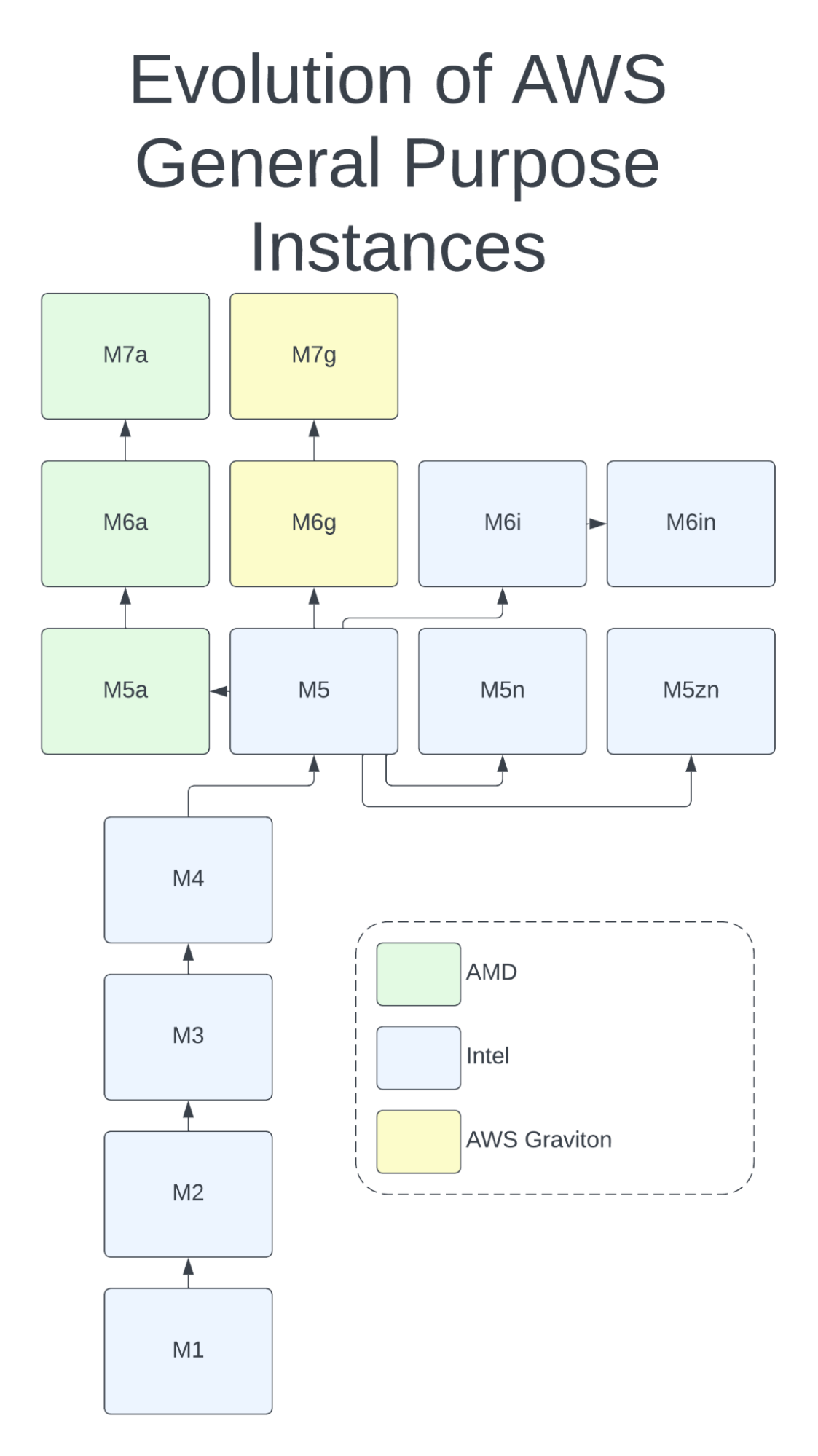
Evolution of the M (general purpose) instance family
For the first four generations of M series instances, there was only one choice: Intel-based instances. At generation 5, AMD introduced the M5a, along with the M5n and M5zn Intel-based instances. In the 6th generation, the AWS Graviton was added to the mix as the M6g, complementing the AMD-based M6a and the Intel-based M6i and M6in. And now, we can choose from 7th generation instances for the AWS Graviton (M7g) and the AMD EPYC-based M7a.
With each generation, the AMD CPU has come closer to matching the speed of its Intel counterpart. In fact, the AMD gen 3-powered M6a has a slightly higher clock speed than the Intel-based M6i, and the gen-4 powered M7a is faster yet. Fortunately, as AMD has improved the performance of its CPUs, it has also kept down costs. AWS users now have an incredible variety of choices in the server CPU space, as well as ample opportunity to optimize their choice of CPU and reduce their AWS spend.
Quick aside:
At CloudFix, we’re big fans of the AWS Graviton CPU (for instance, we recommend running OpenSearch on Graviton to save at least 10% compared to Intel x86 processors.) Like AMD processors, the AWS Graviton offers a lower cost alternative to the standard Intel offerings.
The Graviton differs from AMD processors in that it’s a different CPU architecture, Arm rather than x86. Many applications, such as those written in Python or Ruby, are happy to run on either architecture and there is little to no work involved when you switch between them. However, applications written in a lower level language and compiled into machine code, such as ffmpeg, will need to be compiled specifically for Arm. Even if there are Arm binaries available for your particular application, they may not be optimized to the same extent as their x86 equivalents. This can lead to large performance differences.
The takeaway here: Graviton may offer additional savings compared to Intel, but it’s a different CPU architecture, so switching requires more planning and testing. AMD, on the other hand, uses the same architecture as Intel, so it’s extremely easy to switch between them – and AMD’s lower cost x86 options are often more cost efficient at running real-world applications.
2. Why AMD-powered processors are often more cost-effective than their Intel counterparts
AMD and Intel. Like Pepsi and Coke, Uber and Lyft, Boeing and Airbus, even Alien vs. Predator, these great competitors are leaders in their industries. AMD, with its Ryzen (desktop and laptop), Threadripper PRO (workstation), and EPYC (server) lines, offers highly performant CPUs at a competitive price point. If you are a gamer, you are probably considering an AMD Ryzen 9 for your next build! In the cloud space, as we saw above, AMD has been partnering with AWS since 2018 to offer AMD-based EC2 instances.
The main advantage of the AMD instances is their price/performance, or how much compute you get per dollar spent? In previous generations of AMD processors, the calculus was complex. For example, comparing the Intel-based M5 vs the AMD-based M5a, the AMD processor is 2.5 Ghz vs 3.1 Ghz for the M5. However, this is far from the whole story. From the 2018 Jeff Barr blog post which introduced the M5a and R5a,
The newest EC2 instances are powered by custom AMD EPYC processors running at 2.5 GHz and are priced 10% lower than comparable instances. They are designed to be used for workloads that don’t use all of compute power available to them, and provide you with a new opportunity to optimize your instance mix based on cost and performance.
In other words, the loads processed by these instances are not going to be CPU-bound. If that was the case, it would have been a compute instance instead of general purpose. Comparing the specs of the M5 and M5a for the 12xlarge size:
Instance Size | vCPU | Clock Speed | Memory (GiB) | Instance Storage (GB) | Network Bandwidth (Gbps)*** | EBS Bandwidth (Mbps) | Cost (us-east-1) |
m5a.12xlarge | 48 | 2.5 Ghz | 192 | EBS-Only | 10 | 6,780 | $2.064 |
m5.12xlarge | 48 | Up to 3.1 Ghz | 192 | EBS-Only | 12 | 9,500 | $2.304 |
We notice that:
- The M5a is ~10% cheaper.
- vCPUs and Memory are equal.
- The Intel CPU is 20% faster, using Intel Turbo Boost (hence the “up to 3.1 Ghz”)
- The Intel instance has 20% more network bandwidth and 40% more EBS bandwidth.
What does this all mean when it comes to choosing the “best” instance type? Honestly, it depends. Especially in the older instances, AMD is typically cheaper but not as fast, so deciding comes down to how much compute power you truly need. Because AMD has recently caught up speed-wise, it’s more straightforward to compare newer instances, but still depends on your use case. It’s like comparing a Mustang and a Porsche: which car is “better” depends on the race course. Lots of tight corners, you want the sports car. Big long straightaways, stick with the muscle car. It’s just about the needs of your application.
All that being said, in many cases, switching to AMD will save you money, and often without sacrificing any performance. In one experiment comparing the costs of serving 500 million MySQL queries per hour between AMD, Intel, and Graviton instances, they found that the AMD instance, the c5a.4xlarge, can serve the same load at a 9% cost reduction compared to the Intel-based c5.4xlarge. A 2021 IEEE study found similar results, although in this case, the AMC processor was both faster and cheaper:
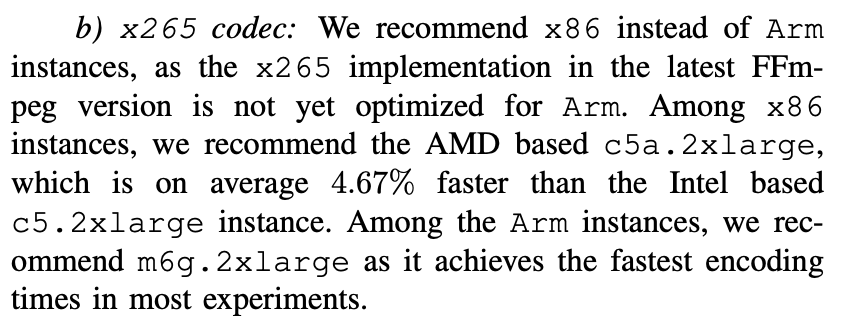
Excerpt from “Where to Encode: A Performance Analysis of x86 and Arm-based Amazon EC2 Instances”
It’s clear that there are savings to be had. And here’s where the beauty of the cloud comes in: to find those savings, we can simply try it. Switch your infrastructure out and see what happens. If it performs just as well at a lower cost, great. If not, switch it back. Just ask this Redditer on the Reddit r/aws thread:

Perfect example. For that particular app, the AMD-powered instance delivered the same performance at lower cost. As for the “tiny bit less money,” that’s where scale comes in. If you optimize every EC2 instance that can achieve equal performance for lower costs, that tiny bit can turn into a whole lot of money.
Interesting aside
It’s interesting to see that AMD, Intel, and the AWS Graviton have converged on using a chiplet-based design. This means that rather than one large die, there are multiple independent components. This allows chips to be custom-designed with features like encoders and encryption units added as needed. AMD was the first to take this approach (to Intel’s disdain), but Intel and AWS recently adopted it as well. Props to AMD for innovating ways to keep its costs down so it can pass those savings on to its customers.
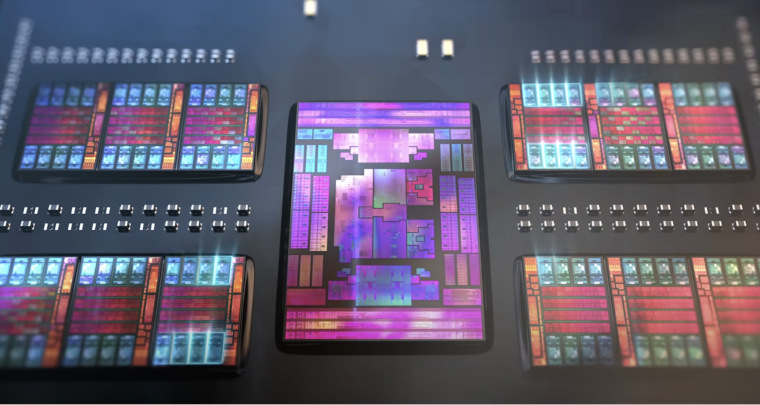
AMD Gen4 Chiplet Design
3. How to find EC2 instances and retype them to AMD
Alright fellow travelers! We’ve shown that AMD CPUs can frequently be a much more cost effective choice than Intel-based CPUs. So how do we go about retyping them to realize those savings?
The starting point is a simple fact of AWS’s own lineup: many Intel-based instance families have an AMD-based counterpart with the same vCPU and memory configuration, usually marked with an “a” in the name. For example:
Find | Intel CPU details | Clock Speed (GHz) | Replace With | AMD CPU Details | Clock Speed (GHz) |
Intel Xeon Platinum 8000, Gen 1 or Gen 2 | Up to 3.1 | t3a | EPYC 7000-series Custom | 2.5 | |
Intel Xeon Platinum 8000, Gen 1 or Gen 2 | Up to 3.1 | m5a | EPYC 7000-series Custom | 2.5 | |
Intel Xeon Platinum 8000, Gen 1 or Gen 2 | Up to 3.1 | r5a | EPYC 7000-series Custom | 2.5 | |
Intel Xeon Platinum 8000, Gen 2 | Up to 3.6 | c5a | EPYC 7002 Custom, Gen 2 | 3.3 | |
Intel Xeon Scalable, Gen 3 | Up to 3.5 | EPYC Zen3 9000 Gen 3 | 3.6 | ||
Intel Xeon Scalable, Gen 3 | Up to 3.5 | EPYC Zen3 9000 Gen 3 | 3.6 | ||
Intel Xeon Scalable, Gen 3 | Up to 3.5 | EPYC Zen3 9000 Gen 3 | 3.6 |
The hard part is knowing which of your instances can make the move without anyone noticing a difference, except on the bill. That means looking at how each instance is actually used. Where the AMD processor has a lower clock speed than its Intel counterpart, as in the older generations, you want to be confident the workload isn’t bound by CPU before switching. For the 6th generation, AMD actually has slightly faster clock speeds, so the calculus is easier.
The retype itself is relatively straightforward, using standard EC2 APIs: take a snapshot for safety, stop the instance, change its instance type to the AMD equivalent, and start it again. If it doesn’t come back up cleanly, change it back. Retyping requires a stop and start, so plan for a brief interruption.
You know us: we always want to err on the side of caution (we’ve said it before, we’ll say it again). That’s why we recommend keeping an eye on the retyped instances in CloudWatch afterwards, to make sure they are delivering equivalent performance, with a plan to roll back if they aren’t.
4. Optimize EC2 instances for price and performance automatically with CloudFix
As with many of our fixers, the process above isn’t necessarily hard. The effort comes less from running the retyping operation and more from the logic, understanding which instances can be safely retyped and ensuring the process runs safely and smoothly… and then continuing to do so for every EC2 instance as your infrastructure evolves.
That’s where CloudFix comes in. We worked directly with AMD to develop our Intel→AMD fixer to make sure that the performance of your application remains competitive and less expensive.
Here’s how it works. The CloudFix finder uses your cost and usage data and your instances’ own CloudWatch history, read-only, to identify Intel-based instances that can be retyped to AMD safely. Each one appears in your Recommendations for you to approve. Once you do, the fixer runs in your own account: it takes a snapshot, retypes the instance to its AMD equivalent, and makes sure it comes up successfully. If there’s a hiccup in the process, CloudFix reverts the changes and notifies you. After the retyping, CloudFix keeps an eye on the instance’s performance for a period, then stops monitoring once the instance proves it’s functioning well, so you have no additional costs.
Another reason to trust CloudFix: our continuous innovation. The new M7a instance type powered by the AMD EPYC Bergamo (4th generation), was just launched last month (June 2023). When a comparable Intel-based instance is launched (presumably to be called the M7i), we will update our fixer to take it and all other new instances into account. With CloudFix, you’re always covered, no matter how fast the industry moves.
Let’s wrap up this road trip with a quote from Channy Yun, principal developer advocate at AWS, who tweeted at the launch of the C6a in 2022:
With the launch of #C6a instances there are now officially more than 500 #AmazonEC2 instances for customers to choose from! https://t.co/54537rGa8B https://t.co/296kmZHGm1
Channy Yun(윤석찬) (@channyun) February 15, 2022
Today, that number is 586. It’s incredible to have so many options for balancing cost and performance, and pretty darn great to have a tool like CloudFix to do so automatically. So go forth, retype and optimize, and achieve more AWS savings than ever… maybe even enough for that trip to Italy.
Ready to start saving on AWS? See how much you could cut from your cloud bill with a free cost optimization assessment, or explore CloudFix automated Finder/Fixers that eliminate waste across 30+ AWS services.
Related Articles
- AWS Cost Optimization: The Complete Guide to Lowering Your Cloud Bill (2026)
- AWS Cost Optimization Tools: The Complete Comparison Guide (2026)
- RightSpend vs ProsperOps (Flexera): The Independent EC2 Discount Alternative
- Find Idle AWS Transfer Family Endpoints
- CloudFix Finder: SageMaker Rightsize Instances (Manual Fix)