Fixer
Scale equals savings when you remove idle Elastic Load Balancers
Idle Elastic Load Balancers in AWS incur charges even with zero traffic. Find and remove unused ELBs across all accounts to cut costs at scale.

Take care of your pennies and your dollars will take care of themselves.
_– Scottish proverb
_
When you think of Scotland, many references come to mind. Macbeth, Braveheart, Outlander (in order of decreasing artistic quality). Bagpipes, kilts, whisky. A certain mysterious loch-bound creature. An instantly recognizable accent. But how about age-old financial wisdom?
Turns out that ancestral Scots were wise in the ways of money. Their proverb – “Take care of your pennies and your dollars will take care of themselves” – is really the foundation of our approach to AWS cost optimization. We’ve talked about this before (unused Elastic IP addresses, idle QuickSight users, unnecessary EBS volumes) and today’s fix is another great example. By cleaning up idle Elastic Load Balancers, you can achieve significant AWS cost savings. Let’s dig in. (But not to haggis. Never to haggis.)

Freedom… from paying too much for Elastic Load Balancers
Table of Contents
- A brief background of idle Elastic Load Balancers
- How to define and identify idle Elastic Load Balancers
- The long route to removing unnecessary Elastic Load Balancers
- Find and delete idle Elastic Load Balancers automatically with CloudFix
A brief background of idle Elastic Load Balancers
With AWS, it’s easy to spin up resources and get the job done – and just as easy to let those resources sit there, accumulating costs, once they’re no longer needed.
Case in point: Elastic Load Balancers (ELBs). Teams typically turn to ELBs when there is more load than can be handled by a single resource, like an EC2 instance. Elastic Load Balancers can distribute the load at an application, network, or gateway level.
You can see the one-to-many relationship between ELBs and other resources, such as EC2 Instances, in the Elastic Load Balancer logo:
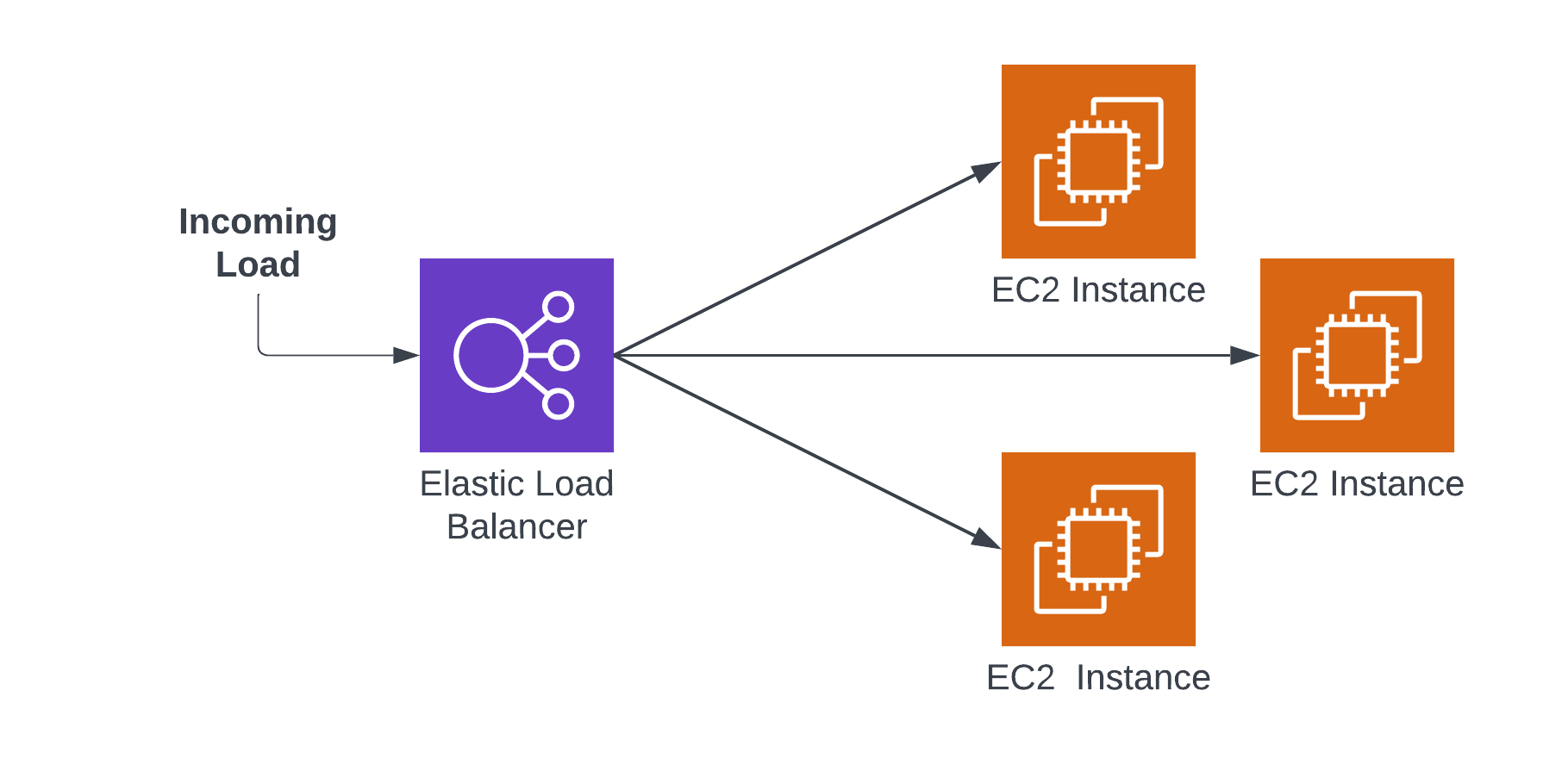
A typical configuration of an ELB and EC2 instances
Idle ELBs turn up when developers turn off the EC2 instances (which, to be fair, are the lion’s share of the cost) without turning off the Elastic Load Balancer. It’s easy to understand how this happens. As a developer makes an application, it can initially be hosted with one instance, but as traffic grows, the developer changes to an ELB + several EC2 configuration. Once the application has been used, the developer turns off the instances and forgets about the ELB.
Elastic Load Balancers seem inexpensive. They’re priced at up to $0.0225/hr, or ~$200/yr. Compared to EC2s or other load bearing resources, that’s peanuts. However, like Elastic IP addresses, ELBs can accumulate over time – and picking up those peanuts can result in substantial AWS cost savings. In fact, one study of a large organization revealed $101K in unused ELBs. Peanuts no more.
You know the drill: let’s look at how you can manually eliminate both types of ELBs (not fun), and how CloudFix can do it for you quickly and easily.
How to define and identify idle Elastic Load Balancers
Elastic Load Balancers come in two different flavors: Classic and v2. There are a handful of differences (v2 includes subtypes like Application Load Balancers, Network Load Balancers, and Gateway Load Balancers, for one), but one big similarity: if it’s an unused Elastic Load Balancer of any type, it makes no sense to pay for it. So, for the sake of this fix, let’s just call them all ELBs.
(Side note: the two types of Elastic Load Balancers are relevant to our discussion because they are managed through separate APIs, which makes cleaning up idle ELBs by hand even more arduous than usual. More on that in a minute.)
How do you define an idle Elastic Load Balancer? Simply put, it’s one that hasn’t routed any traffic for a long stretch of time. If a load balancer has been sitting there with nothing to balance for months, whatever it used to front has moved on, and the ELB is just a line item on your bill.
Next question: how do you find the idle Elastic Load Balancers? Like most of these finder/fixer combinations, it requires merging multiple data sources: an inventory of every load balancer (Classic and v2, in every region and every account) plus the traffic metrics AWS publishes for each one in CloudWatch. Classic ELBs even predate ARNs, so just keeping track of which load balancer is which takes care. Doing that by hand, across all of your accounts, every month, is a lot of spreadsheet work for a few hundred dollars per load balancer.
Now that you’re loaded with the background on idle ELBs, let’s take the balance of the article to talk about how to eliminate them. (See what we did there? #DadJokes4Life)
The long route to removing unnecessary Elastic Load Balancers
Once you’ve found your idle ELBs, you still have to get rid of them, and once again you have to deal with the two-type situation.
Classic ELBs distribute load to EC2 instances that are registered with them, so those instances have to be deregistered before the load balancer can be deleted. v2 ELBs distribute traffic to target groups, which contain individual targets, so the targets have to be deregistered and the target groups cleaned up before the load balancer itself can go.
None of it is hard, exactly. It’s just tedious, easy to get wrong, and it has to be repeated for every idle ELB in every region of every account.
Find and delete idle Elastic Load Balancers automatically with CloudFix
Phew. Even in summary, that’s a lot. We need a bagpipe break.
Clearly, the manual process of finding ELBs, identifying the idle ones, and removing them (across two types, nonetheless, with all the deregistering rigamarole) is complex and time consuming. Yes, it’s possible. No, it’s not a good use of your time. Heck no, you would never do it across each and every ELB, each and every month.
Instead, take care of your pennies with CloudFix. The CloudFix finder uses your cost and usage data and the load balancers’ own traffic metrics to find both types of idle ELBs, read-only, across all of the accounts linked to your master payer account. Each one appears in your Recommendations for you to approve. Once you do, the fixer runs as an AWS Systems Manager Automation runbook in your own account and removes the idle load balancer, and every execution is logged. While $200 savings per ELB is definitely not worth the engineering effort manually, those pennies add up at scale. And like all CloudFix fixers, it’s continuous.
This week, we salute the wise old Scots who penned such a genius proverb. Get in touch to see how CloudFix makes it easy for your dollars to take care of themselves.
Ready to start saving on AWS? See how much you could cut from your cloud bill with a free cost optimization assessment, or explore CloudFix automated Finder/Fixers that eliminate waste across 30+ AWS services.