Fixer
Reduce AWS CloudTrail costs by de-duplicating trails
Duplicate AWS CloudTrail trails generate redundant event logging charges. Learn how to identify and de-duplicate trails to cut CloudTrail costs.

I could go back in the direction I had come from, or I could go forward in the direction I intended to go.
_– Cheryl Strayed, Wild: From Lost to Found on the Pacific Crest Trail
_
In the 2014 movie Wild (and the book that inspired it), Reese Witherspoon’s character hikes the Pacific Crest Trail (PCT) in search of deeper meaning and personal growth. In the opening scene of the film, she throws her boots off of a mountainside in frustration because they weren’t sized appropriately and weren’t worth the added weight. (Fun story: the movie crew never found the boot, but a hiker did a few months later.)

I can relate to this moment on a couple of levels. I grew up in the Pacific Northwest and have hiked parts of the PCT; I can attest that this trail is just as stunning as it looks. I also understand the impulse, on the trail or otherwise, to get rid of things that are weighing you down… which brings us to today’s topic.
Like poorly-fitting boots, duplicate trails in AWS CloudTrail just aren’t worth keeping around. While we can’t exactly chuck redundant trails off a cliff, we can get rid of them (manually or easily and automatically) – and achieve significant AWS cost savings in the process.
Table of Contents
- AWS CloudTrail: What it does, how it works, and why we use it
- Why do we end up with duplicate AWS CloudTrail trails?
- How much can you save by deactivating redundant AWS CloudTrail trails?
- What makes a CloudTrail trail redundant?
- Automatically deactivate duplicate CloudTrail trails with CloudFix
AWS CloudTrail: What it does, how it works, and why we use it
Before we dig in, let’s quickly review the basics. AWS CloudTrail is a service for monitoring and recording AWS API calls across the vast majority of AWS services, including EC2, VPC, S3, IAM, EBS, CloudFront, SQS and more. We use it to understand and audit the actions taken across AWS accounts. We also rely on CloudTrail for compliance purposes, to record logs for industry-specific or internal IT standards.
Within CloudTrail, there are several event types, including data events, management events, and Insights events. In this blog, we’ll focus on management events, which broadly concern the creation, usage, and deletion of AWS resources. Creating an S3 bucket, for example, would be a management event.
You can aggregate and organize the events that CloudTrail monitors by creating trails. (These trails, unfortunately, aren’t quite as lovely as the PCT. Far fewer conifers.) According to AWS, “a trail is a configuration that enables delivery of events to an Amazon S3 bucket that you specify. You can create a CloudTrail trail to archive, analyze, and respond to changes in your AWS resources.” For instance, a trail that records network configuration changes can help make sure that your network is functioning as intended, or a trail that monitors the creation of S3 buckets can ensure that proper encryption policies are in place, which is particularly important to HIPAA, PCI DSS, and GDPR.
In other words, trails allow teams to easily monitor a set of events within a pre-defined group of AWS services, all in one place and with useful metadata such as the event source, source IP address, and user identity. They’re incredibly useful for providing an audit trail of exactly what is happening in an AWS account, but they can also drive up costs if you’re not careful how you use them.
Why do we end up with duplicate AWS CloudTrail trails?
AWS CloudTrail can support multiple trails, including multiple trails that monitor some of the same events. This flexibility can be a good thing. It also makes it easy to create and pay for trails that end up being redundant. This is how cost overruns occur, and why we’re digging into this topic in the first place.
Say one IT administrator is interested strictly in S3 and EC2 usage, while another is tasked with complying with a particular standard, like HIPAA. They both create trails to meet their specific needs, but in the process, they may capture overlapping events.
This situation typically happens naturally due to lack of communication. Everyone’s working in their own siloes, doing their own thing, and no one thinks about the fact that other people may be monitoring the same events. It’s especially pronounced in large organizations, where disparate teams create CloudTrail trails to monitor their specific resources and events. The result: redundant trails, duplication of effort, and most importantly, increased costs that tend to go under the radar.
There’s another scenario in which IT teams acknowledge the overlap between trails, but do it anyway. Why? The argument is that having logically differentiated trails, like one trail for HIPAA and another for S3+EC2, makes it easier to review and comply with regulatory requirements. The logs live in their own easily accessible buckets, and the reduced complexity is worth the extra cost.
Is it worth it? We vote no. The primary purpose of CloudTrail logs is simply existing in case of an audit. Events are recorded in S3, so the owner of the AWS account is compliant. The end. For audit purposes, just proving that the data exists is enough. If the data really needs to be queried for some reason, we can use tools like Athena, ElasticSearch/Logstash/Kibana (the ELK Stack), DataDog, or Splunk. These tools are filtering data anyway, so separating some out for a particular audit isn’t an issue.
Useful aside: What to do instead of creating unique CloudTrail trails for each use case
Instead of creating a variety of logically differentiated trails, we recommend having one large trail. The “master trail” records all of the events you need to meet all of your requirements, which you can filter after the fact if necessary. By using the same trail as a data source for multiple dashboards and reports, you can really optimize your CloudTrail spend. Combine this with AWS’s free storage of the first copy of a management event, this approach can eliminate a large portion of your CloudTrail costs. Cheers to greater AWS cost savings.
In any event: whether you end up with duplicate CloudTrail trails because of a lack of communication or deliberate strategy, you’re paying way too much for them. CloudTrail records the events associated with a trail into corresponding log files in S3, and charges based on the number of recorded events in a trail. So, back to our example above, if IT admin #1 and IT admin #2 are recording the exact same set of events for different reasons, you’re paying for it twice – and overpaying for AWS is not how we roll.
How much can you save by deactivating redundant AWS CloudTrail trails?
Just how much does it cost to support redundant versions of CloudTrail trails?
CloudTrail management events (the ones we’re interested in) cost $2.00 per 100,000 events delivered. At first glance, this seems trivial. But, loyal readers, we’ve been here before! Just like many other AWS resources (looking at you, elastic load balancers and elastic IP addresses), the cost can scale endlessly, and endlessly scaling costs are never a good thing. Also, as mentioned above in our Useful Aside, the first copy of a management event is stored for free. If we’re clever about only storing one copy of an event, we can substantially reduce our costs.
Some of the most common CloudTrail management events are:
- EC2: RunInstances, StartInstances, StopInstances, TerminateInstances
- Lambda: CreateFunction, UpdateFunctionCode, DeleteFunction
- RDS: ModifyDBInstance, CreateDBSnapshot
- SQS: CreateQueue, DeleteQueue
- CloudFormation: CreateStack, UpdateStack, ValidateTemplate
- S3: CreateBucket
These operations occur frequently in the course of managing a large AWS deployment and add up fast. In fact, one of our large customers had nearly $90K in annual CloudTrail management event spend. Of that, it turned out that a full $74K – 82% – was redundant and could be eliminated. While the numbers will change with every company, it’s clear that there are savings to be found here.
CloudTrail event costs are a large and complex topic. Read on to get deeper into the nitty gritty, then check out
this AWS Knowledge Center article. It provides additional details and recommendations about the cost of duplicate management events and the types of events that can drive up costs.
What makes a CloudTrail trail redundant?
We know why it’s worth going after duplicate CloudTrail trails: they’re costly and unnecessary. Finding them by hand, however, isn’t simple. Trails are configured per region, every trail has its own set of recorded events and settings, and the number of trails you would need to compare against each other grows quickly as teams add more of them.
When two trails record some of the same events, the overlap takes one of three shapes.
Partial overlap
With a partial overlap, the trails are monitoring some of the same events, but some events are unique to each trail. Neither one can be switched off without losing data someone may depend on, so we keep them both. Ideally, if you follow the Useful Aside above and just have one trail that accounts for every requirement, you won’t run into this issue.
So: partial overlap, no opportunity to deactivate duplicate trails. The next two cases, however, are where we can find our redundancies, and cut our costs.
Equivalent trails
Both trails record the same events with compatible settings. You are paying twice for exactly the same data, which means potential for savings!
One trail is a subset of the other
Here one trail does everything the other does, and more. Say we have a trail set up to monitor the CreateBucket and DeleteBucket management events. Now, say your colleague down the (probably virtual) hall creates a trail that records all management events. Your colleague’s trail captures the CreateBucket and DeleteBucket events just like your original trail, plus lots of others, so you end up double paying for those bucket events. The smaller trail is the redundant one.
Don’t forget downstream consumers
There is one more wrinkle. Even when two trails record the same events, they may feed different downstream consumers, like dashboards. Before a trail is deactivated, those consumers need to be pointed at the remaining trail, with their filters adjusted so the data they see stays the same. It’s important to implement and test this before the trail is switched off.
Here’s what this looks like in action:
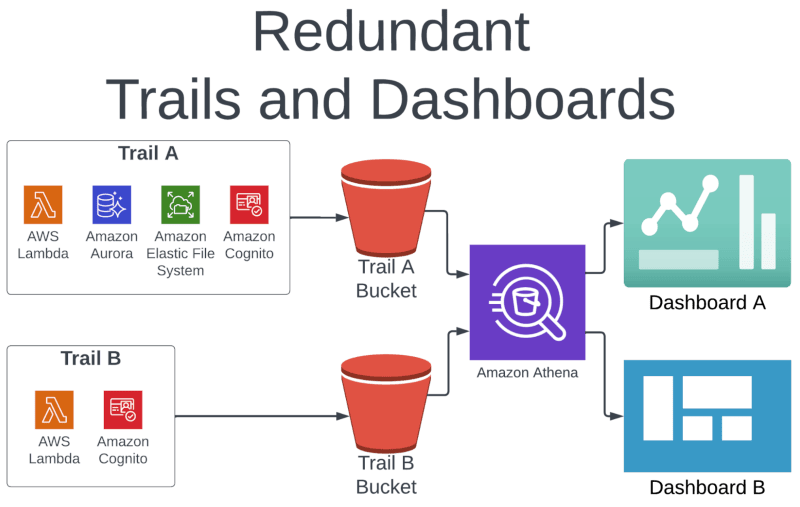
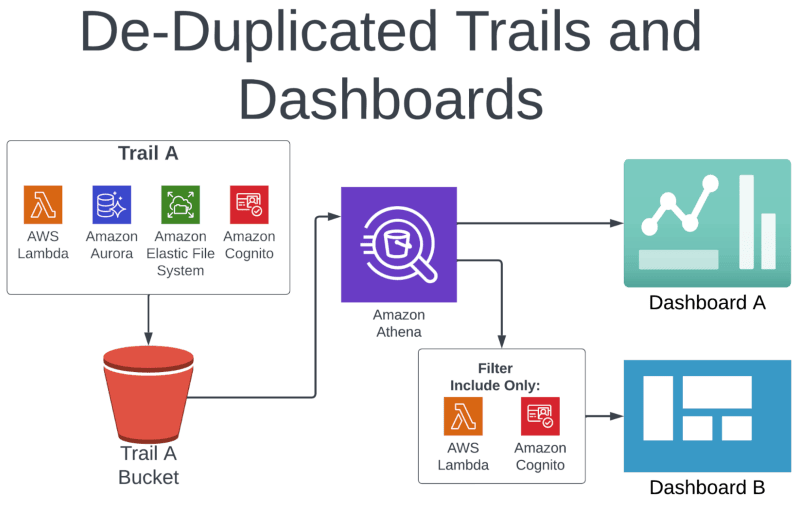
In the example above, Trail A is recording events for Lambda, Aurora, EFS, and Cognito. Trail B is recording data for just Lambda and Cognito. In this case, Trail A is a superset of Trail B.
We can deactivate Trail B, since it’s redundant with Trail A; Trail A actually has more data than what is required for Dashboard B. Notice that we are using Amazon Athena to power both dashboards, so we can simply modify the query that powers Dashboard B to exclude the unnecessary data.
There are a variety of tools to process and visualize data in this way. We’re partial to AWS native tooling like Athena and QuickSight, but if you’re a Splunk or Tableau shop, for instance, use what you’re comfortable with. The key takeaway is that there may be some modification required to the downstream consumers of the deactivated trail.
Automatically deactivate duplicate CloudTrail trails with CloudFix
CloudFix, of course, makes that very arduous process much, much easier.
CloudFix’s finder works read-only from your cost and usage data and your CloudTrail configuration to find trails that fully duplicate, or are fully covered by, another trail. Each one appears in your Recommendations for you to review. This is one of the rare occasions where it’s not strictly as simple as approving the change and enjoying the savings: you still need to check on downstream consumers yourself, as described above.
Once your downstream consumers are squared away, approve the recommendation. The fixer runs as an AWS Systems Manager Automation runbook in your own account and deactivates the redundant trail, and every execution is logged. The result: you remain in compliance without paying for the same event twice. That’s more money and time in your pocket, time enough, perhaps, to enjoy some real trails.
Ready to start saving on AWS? See how much you could cut from your cloud bill with a free cost optimization assessment, or explore CloudFix automated Finder/Fixers that eliminate waste across 30+ AWS services.