Fixer
OpenSearch EBS Volumes Overprovisioned? Cut Storage Costs 50%
Right-size OpenSearch EBS volumes to cut AWS storage costs by up to 50%. Overprovisioned volumes waste money. Learn why it happens and how to right-size cluster storage.

400 million cups
_– the amount of coffee that Americans drink every day
_
Many of us depend on a single numerous cups of coffee to stay productive and get things done. While we rely on coffee to perk us up, however, it can sometimes slow us down. Who hasn’t stared at the coffee shop board, frozen by analysis paralysis, trying to decide between all the different types and sizes? It’s a fraught choice: order too much and you waste money and coffee (never a good thing), but order too little, and you risk snoozing on your desk in the early afternoon, which is also not ideal.

Too Many Coffee Choices, generated by the Midjourney Generative Art AI
You can probably see where we’re going with this. AWS, like your local coffee shop, lets you customize your “order” almost endlessly – but it also makes it easy to get too much or too little of a given product or service. That’s why we talk a lot about right-sizing AWS services (like here) and what brings us to our topic today: how to balance size and cost in OpenSearch EBS volumes. Let’s dig in – or, shall we say, drink up.
Table of contents
- Hot storage, EBS volumes, and gp2/gp3: Behind the scenes with OpenSearch storage
- Why your EBS volumes are overprovisioned: The trap of “I’ll adjust it later”
- How to save 50% or more by right-sizing EBS volumes
- How CloudFix right-sizes OpenSearch EBS volumes
- Right-size your OpenSearch EBS volume costs easily and automatically with CloudFix
Hot storage, EBS volumes, and gp2/gp3: Behind the scenes with OpenSearch storage
OpenSearch is a document indexing and searching platform. It can ingest and search a large amount of both machine-generated data like logs and unstructured document data. OpenSearch is extremely fast and useful. It makes it easy to create analytics solutions and add text search functionality to an application or website.
Technically, OpenSearch is the open-source software and the AWS service that runs OpenSearch is the Amazon OpenSearch Service. In practice, people refer to both simply as “OpenSearch.” The OpenSearch Service also can run ElasticSearch, which was the original version of the software. This VentureBeat article, aptly titled Once frenemies, Elastic and AWS are now besties, does a great job of discussing the relationship between OpenSearch and ElasticSearch. If you’re hungry for even more, my colleague Rahul and I chatted about it on an early episode of our AWS Made Easy livestream as well.
Quick side note
In January, AWS released a really neat product called OpenSearch Serverless, which Rahul and I covered in an episode of AWS Made Easy. We’re both big supporters of serverless infrastructure, and recommend investigating if OpenSearch Serverless could be a good option for your organization.
Back to standard OpenSearch. In the default AWS OpenSearch product, OpenSearch runs on a cluster of provisioned resources, which uses special instances with the .search suffix, such as t3.small.search. In addition to compute, a cluster requires associated storage. OpenSearch storage is a complicated topic, so let’s do a quick review.
OpenSearch’s fundamental data storage is the index. An index is a data structure that contains documents as well as metadata optimized for searching, filtering, and analysis. The index can hold far more data than can be stored on one machine. So, to make the index searchable as a unit, it’s divided into shards. The shard is the basic unit of storage and retrieval in OpenSearch, and is essentially a smaller, self-contained index. Shards exist on one node of the cluster and are classified as either primary or replica shards. Primary shards can update data, and replica shards make querying faster.
The performance of the OpenSearch cluster is highly dependent on the performance of its underlying storage media; the faster that OpenSearch can access the data, the faster it will run. There are different storage tiers for indices, and a cluster can search multiple indices simultaneously. Hot storage is the tier used by standard AWS OpenSearch data notes and is powered by Amazon EBS volumes. UltraWarm, which is less performant and less expensive than hot storage, uses AWS S3 as the underlying storage media, plus a cache to improve performance. Cold storage is also based on AWS S3, comparable to the S3 Glacier Flexible Retrieval storage class.
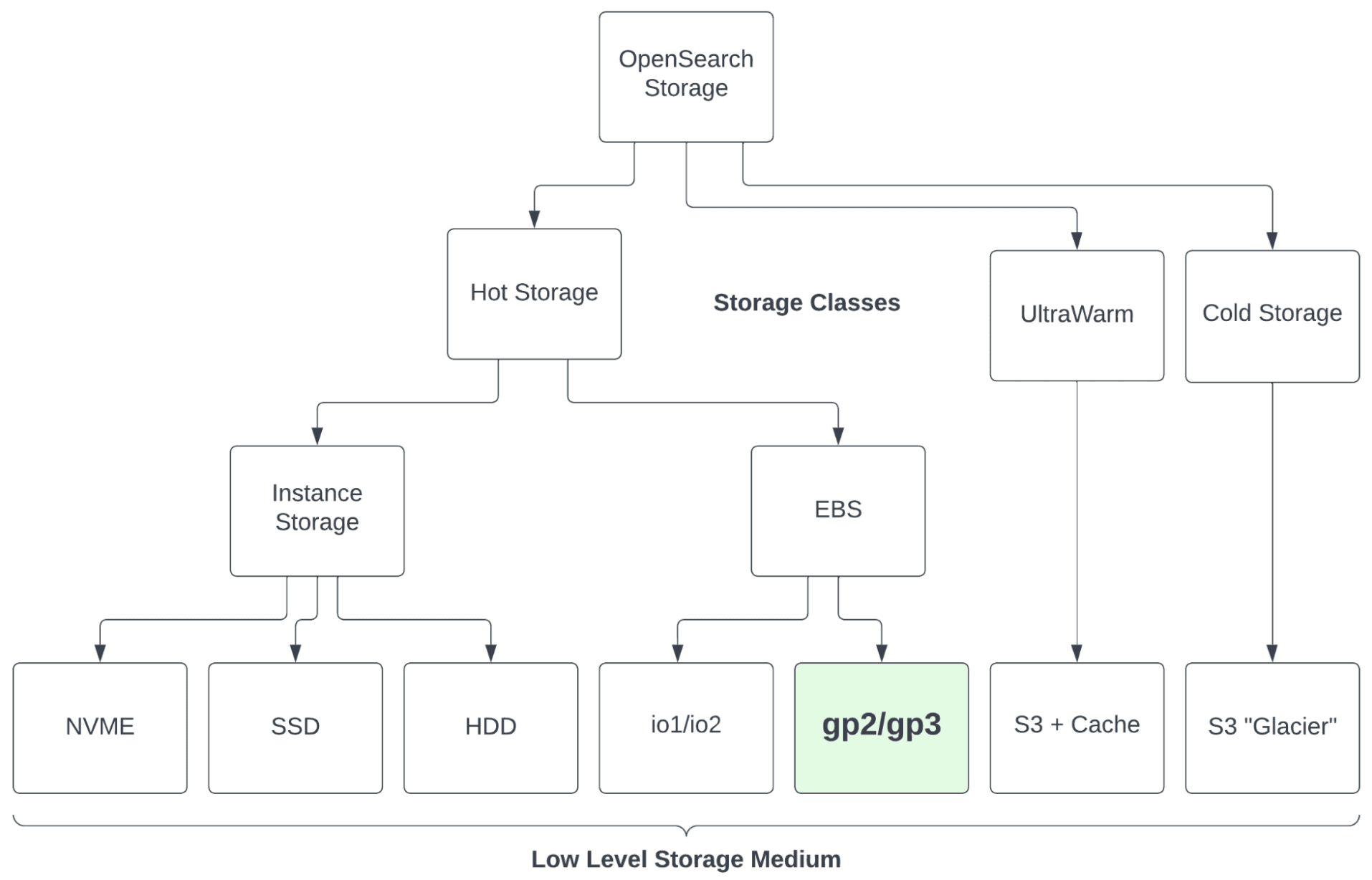
OpenSearch Service storage types
In general, most OpenSearch users rely primarily (or entirely) on hot storage and add some UltraWarm or cold if/when it makes sense. That balance is not the only decision you need to make, though. Within the hot storage tier, you can also decide between EBS volumes and instance storage, and within EBS, whether to use io1/io2 or gp2/gp3.
These choices are pretty straightforward. In almost every instance, you want to use EBS volumes instead of instance storage. While instance storage is fast, it’s not durable, and it will vanish if the instance gets terminated. Similarly, io1/io2 are blazingly fast, but just as blazingly expensive. That level of speed is rarely necessary or worth the cost. Which leaves us with our old favorites, gp2 and gp3. We’ve said it before and we’ll say it again: we love the performance, low cost, and flexibility of gp3. Although it’s slightly less performant and less flexible, gp2 works just fine as well.
Useful aside: The case for gp3
When it comes to EBS volumes, you’d be crazy NOT to use gp3. Why? The key dimensions when creating an EBS volume are size, throughput, and IOPS. WIth gp2, the only dimension you can choose is storage, and then throughput and IOPS scale up proportionally. Likewise, if you need more throughput, you have to pay for more storage and more IOPS. Not very flexible or cost-effective.
With gp3, you can adjust these levers independently, so you get the precise performance that you need and don’t pay for components that you don’t. If your budget is fixed, gp3 will offer better performance. If you need to achieve certain performance criteria, gp3 will do this for less. While gp3 pricing can be a little convoluted, we’ve run the numbers, and gp3 is always the better option. For more on gp3, check out this recording of an AWS Made Easy livestream.
Why your EBS volumes are overprovisioned: The trap of “I’ll adjust it later”
So, if you’re using OpenSearch, you’re probably using gp2 or gp3 as your EBS storage media. Now the question is, why are you using so much of it?
In a nutshell, we end up with too much OpenSearch storage because we’re human.
We still haven’t fully adjusted to the flexibility of the cloud. We’re used to having to decide on the size of resources, like our coffee, and then being stuck with the consequences of that decision. Once that cup’s in your hands, you’re not going back to upgrade to Venti. This has traditionally been true with technology, too. When you buy a computer, especially laptops that aren’t upgradeable, you’re stuck with your chosen specs for the lifetime of the hardware.
This mindset is hard to break. We want to make sure that we have enough if we need it, so we overestimate. It’s tough to truly internalize that you can resize and change most cloud resources at any time.
The second way that being human leads to overprovisioning EBS volumes: procrastination. This is a close personal friend of mine. When you start a project, it makes sense to use larger resources. You want the development experience to be quick, and when you are building, testing, and deploying, the process typically uses more resources than the project will require in its steady state. As a result, we provision a larger instance than we need in the long run, with a mental note that “we’ll adjust it later.” Spoiler alert: we won’t. Once the project is successfully up and running, we move on to the next one, and our original resource remains faster, larger, and more expensive than it needs to be.
How to save 50% or more by right-sizing EBS volumes
EBS volumes for OpenSearch cost considerably more than their standard EBS counterparts. For example, us-east-1 EBS volumes for gp3 cost $0.08/GB, compared to $0.122 when part of an OpenSearch cluster.
Here’s how EBS volumes for OpenSearch are priced as of April 2023 in us-east-1:
Type | Item | Cost |
gp3 | Storage | $0.122 GB/Month |
gp3 | IOPS | 3000 Free up to 1024 GiB, or 3 IOPS/GiB free for volumes above 1024 GiB. $0.008/provisioned IOPS above free limits. |
gp3 | Throughput | 125 MiB/s free up to 170 GiB, or +250 MiB/s free for every 3 TiB for volumes above 170 GiB. $0.064/provisioned MiBs over free limits. |
gp2 | Storage + IOPS + Throughput | $0.135 per GB / month |
Magnetic | Storage + IOPS + Throughput | $0.067 per GB / month |
io1 | Storage | $0.169 per GB / month |
io1 | IOPS | $0.088 per IOPS / month |
For full details, see AWS OpenSearch Service Pricing
Let’s look at an example to see how EBS costs change when we make some strategic adjustments.
Say we have an OpenSearch cluster with 3x hot storage EBS gp3 volumes, each at 800 GiB. Assume that the baseline levels of IOPS and throughput are sufficient for our needs, so we’re only looking at the storage rate. Our data is growing at 15 GiB per month, starting at a 200 GiB baseline. Doing a simple pricing exercise:
Month Number | GB/Node | Free Space % | Cost Actual | Cost at RVS | $Savings | %Savings |
1 | 215 | 73.13% | $292.80 | $123.708 | $169.09 | 57.8% |
2 | 230 | 71.25% | $292.80 | $130.845 | $161.96 | 55.3% |
3 | 245 | 69.38% | $292.80 | $137.982 | $154.82 | 52.9% |
This table compares the current cost of the EBS volumes to their cost once we adjust them to their recommended volume size (RVS). Take a look at the percentage of free space. It starts at 73% and ticks down slowly over time. Although having 73% free space may be prudent when you’re provisioning hardware over a multi-year time scale, it’s definitely overkill in the cloud. You still want some free space, of course: enough headroom for growth and surprises, without paying for capacity that sits empty.
Check out the savings in the last column! We cut costs by more than half using the recommended volume size, while maintaining a solid buffer. Best of both worlds.
One thing to note here. This pricing example assumes that we resize EBS volumes for OpenSearch to the recommended volume size on a regular schedule. There’s no dollar cost to resize, but it’s still a change, and all change comes with some risk. For example, the cluster may enter a red status, indicating that some indices have been lost. The goal is a measured cadence that balances AWS cost optimization against how often you change your infrastructure.
If you’re using CloudFix to right-size your EBS volumes, you have nothing to worry about. CloudFix keeps an eye on the cluster’s health after the change. It will notify you if there are any issues with the resize, then guide you through a rollback and restore. If you’re resizing EBS volumes manually, make sure to monitor your OpenSearch cluster health and have a process in place to remediate any potential problems.
How CloudFix right-sizes OpenSearch EBS volumes
Fill up that cup of coffee. Here’s where it gets easy.
The finder works read-only: CloudFix uses your cost and usage data and OpenSearch’s own storage metrics to find domains whose EBS volumes carry far more free space than they need, and works out a recommended volume size that still leaves room for growth. Each opportunity appears in your Recommendations with the projected savings, and nothing changes until you approve it. Once you do, the fixer runs as an AWS Systems Manager Automation runbook in your own account and shrinks the volumes to the recommended size, and every execution is logged.
For our friends with gp2: We highly recommend switching to gp3 volumes wherever possible (and CloudFix makes it super easy to do so). With gp2, IOPS and throughput scale with volume size, so you may need to keep a volume larger than your data alone requires to hit a target IOPS or throughput.
Right-size your OpenSearch EBS volume costs easily and automatically with CloudFix
Simply changing the size of an EBS volume for OpenSearch is easy. Changing the size in a strategic, informed way, however (and therefore minimizing costs while mitigating risk), is where the process gets clunky.
The right target size depends not only on how much free space you have today, but on how fast your data is growing and how much headroom you want to keep. Working that out for each cluster, over and over, is not the most impactful way to spend your time, and it quickly becomes tedious.
Not with CloudFix. We built safe heuristics into the automation, so you can strike the balance between how often volumes are resized and the potential for AWS cost savings. CloudFix regularly scans your OpenSearch clusters and proposes any AWS cost optimization opportunities that it finds, and it won’t keep re-proposing changes to a cluster you’ve just right-sized. The built-in buffer and ongoing monitoring also keep you prepared for unexpected changes to your cluster’s space usage.
There’s a lot of hard-earned knowledge and experience built into this finder/fixer, and a lot of potential cost savings. Skip the hassle of right-sizing EBS volumes for OpenSearch yourself. Instead, simply enable the “Shrink AWS OpenSearch volumes” fixer, evaluate and approve the changes, and enjoy the AWS cost savings… perhaps with a hot cup of coffee.
Related Articles
- AWS Cost Optimization: The Complete Guide to Lowering Your Cloud Bill (2026)
- AWS Cost Optimization Tools: The Complete Comparison Guide (2026)
- DynamoDB Standard-IA: Save 60% on Storage Costs (2026 Guide)
- GP3 vs IO2: Up to 87% Cheaper, Real AWS Pricing Benchmarks (2026)
- GP2 vs GP3 AWS: 20% Cheaper, Faster IOPS, Full Cost Comparison